Do Not Disclose Room Types to Guest
Stay is enhanced to allow users to choose if the reservation’s upgraded/modified room type must be disclosed to guests or not.
When users choose not to reveal the reservation’s upgraded/modified room type, the room type details that the guest is upgraded to are not displayed to guests in the following areas:
-
Registration Cards
-
Folios (print and email)
-
Invoices
-
Confirmation emails sent to guests (from Stay and ADM)
This enhancement is not applicable to reservations in share.
Feature Setting
The following new feature setting has been introduced to allow users to hide the modified/upgraded room type details of reservations:
-
Name: Do Not Disclose Room Type To Guest
-
Value: Must be enabled
-
Comments: License is not required
When the new feature setting is enabled, users can choose not to disclose the modified/upgraded room type details from the following areas of the reservation:
-
Currently Selected Room section
-
Modifying room type via Modify Stay screen
-
Upgrading room type via Recommended Upgrades section
-
Room type conversion
-
Modify room type via Tape Chart screen
-
Other Matching Rooms section
-
Moving reservations to other properties
Currently Selected Room Section
Users can choose not to disclose the modified/upgraded room type details by enabling the Do not disclose room type to guest flag in this section. If this flag is disabled, the room type details of the room to which the guest has upgraded to are displayed.
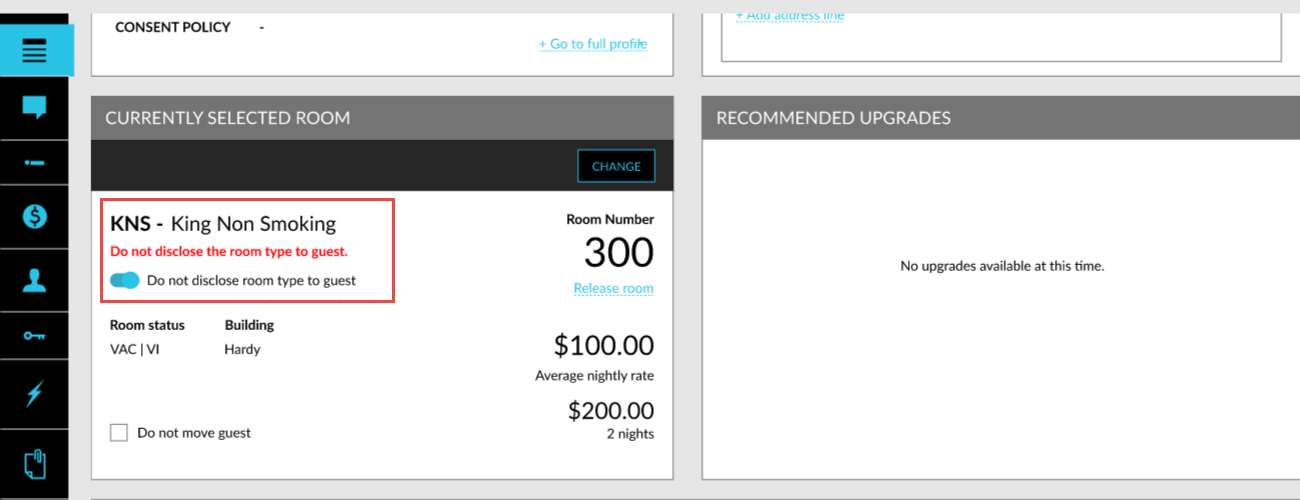
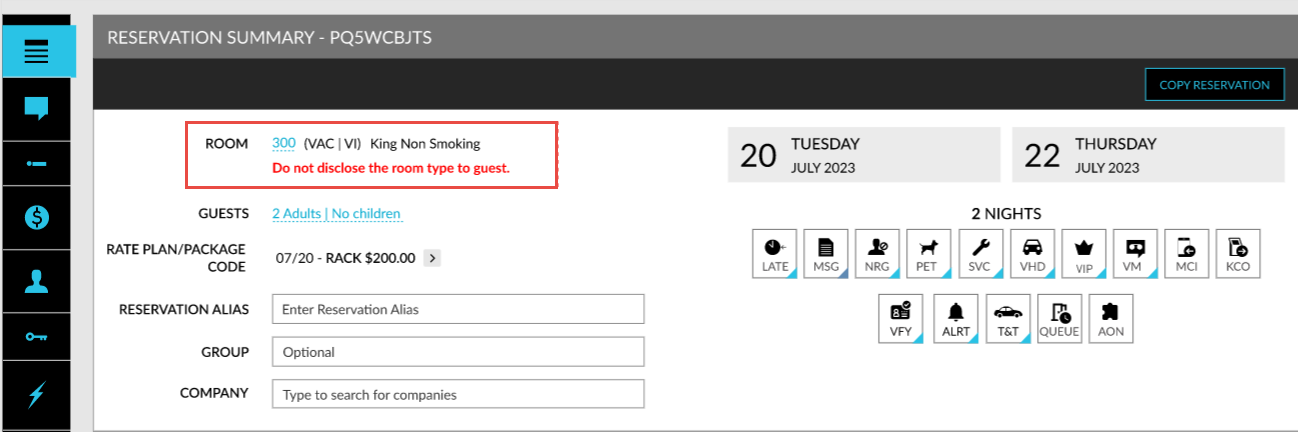
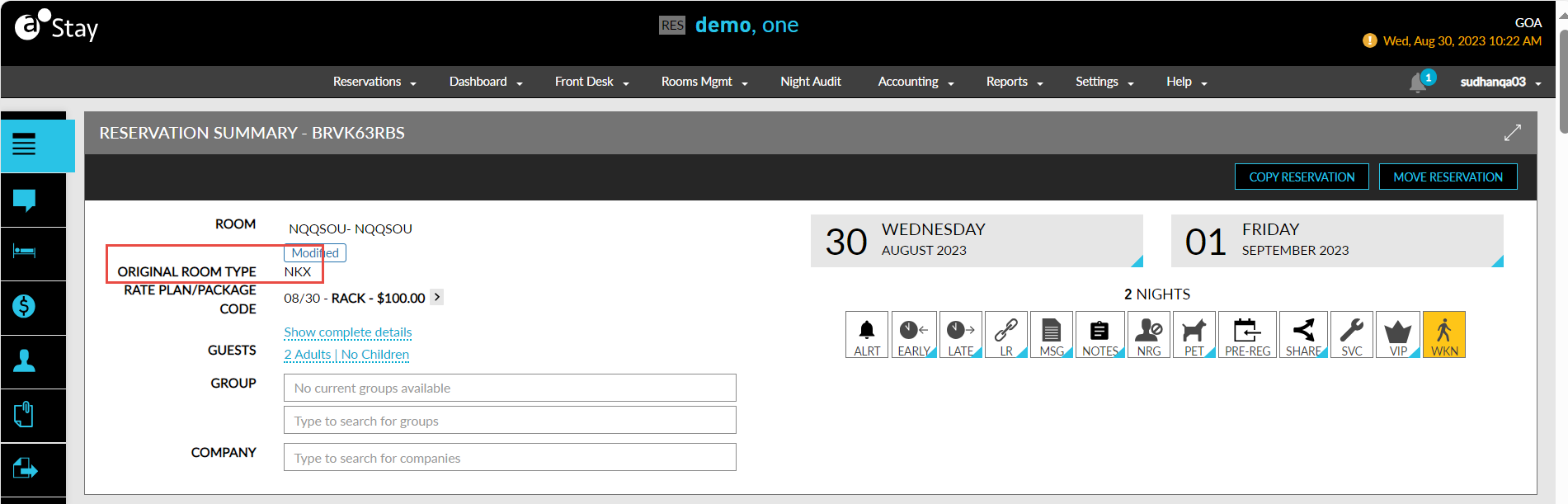
When enabled, the Do not disclose the room type to Guest label is displayed in the Reservation Summary section and in the Currently Selected Room section of the reservation and the previous room type of the guest is displayed in the Original Room Type field in these sections. The upgraded room type and the room number assigned is not displayed in the following:
-
Registration Cards
-
Folios (print and email)
-
Invoices
-
Confirmation emails sent to guests (from Stay and ADM)
Modifying Room Type from Modify Stay Screen
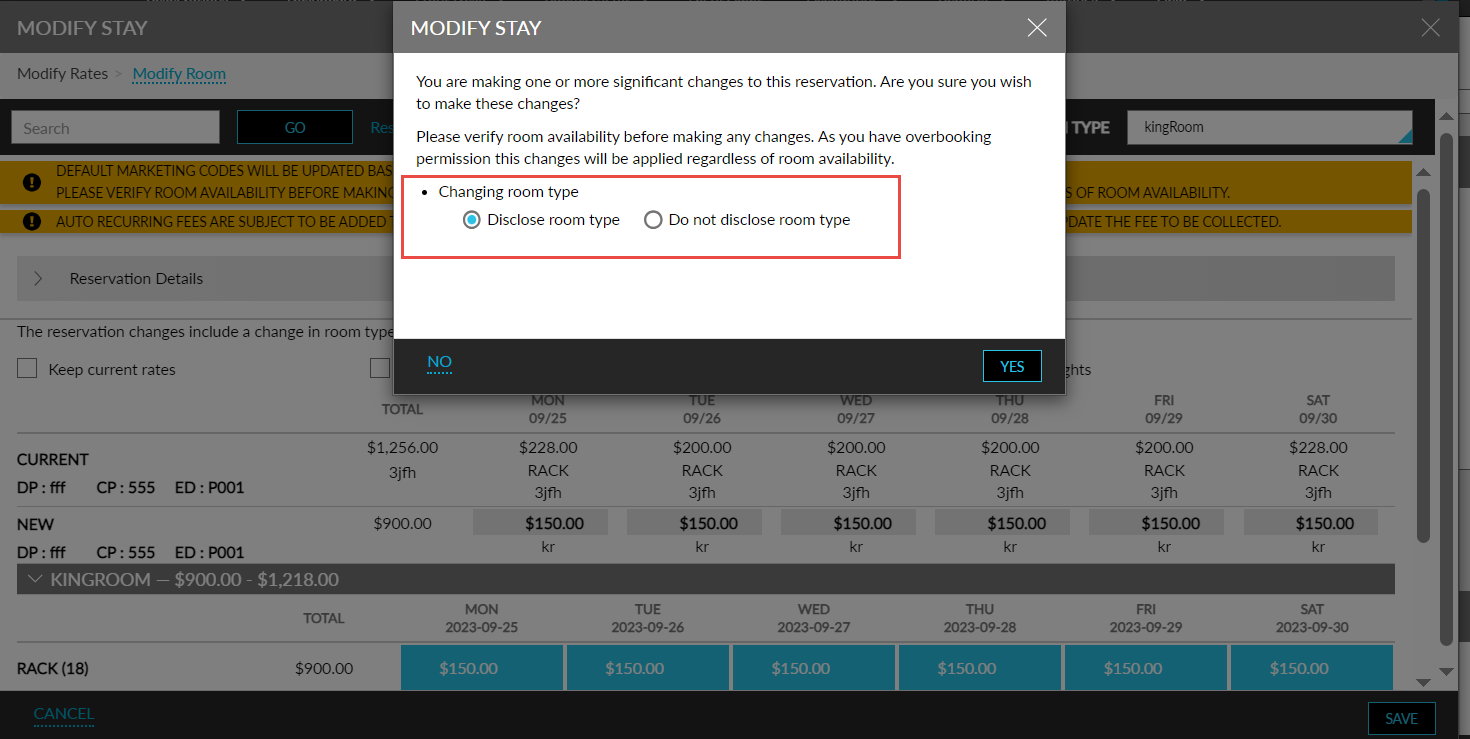
When users modify the room type of a reservation from the Modify Stay screen, they are prompted to choose if the modified room type details must be displayed to guests or not. If users choose not to disclose the room type details, the Do not disclose room type radio button must be selected in this screen. If users choose the Disclose room type radio button, the room type details are displayed.
When the Do not disclose room type radio button is selected, the Do not disclose the room type to Guest label is displayed in the Reservation Summary section and in the Currently Selected Room section of the reservation with the Do not disclose room type to guest flag enabled.
Upgrade Room Types via the Recommended Upgrades Section
When users upgrade to different room types from the Recommended Upgrades section of the reservation, users can choose not to disclose the room type details by enabling the Do not disclose room type to guest checkbox in the Room Move Confirmation screen. When enabled, the upgraded room type details are not disclosed.
Room Type Conversion
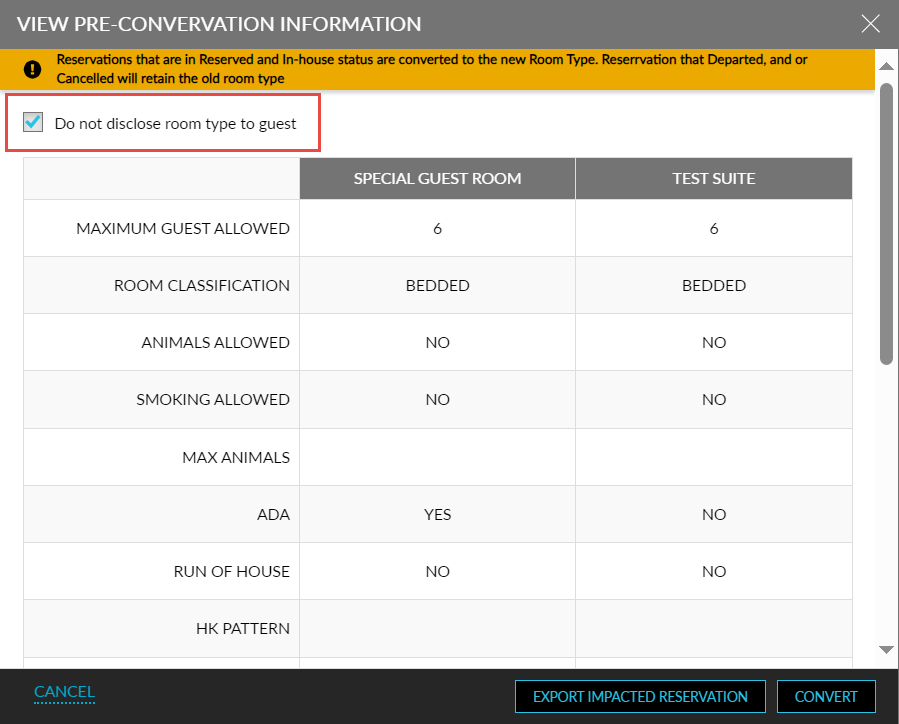
When users choose to convert the room type of all or selected rooms from the Room Type Conversion tab of the Rooms Setup screen (All Settings ➜ General ➜ Rooms & Room Types), users can choose not to disclose the room type details by enabling the Do not disclose room type to guest checkbox in the View Pre-Conversion Information screen. When enabled, the converted room type’s details are not disclosed.
Modify Room Type via Tape Chart Screen
When users modify the room type of a reservation using the Edit Reservation option on the Tape Chart screen, they are prompted to choose if the modified room type details must be displayed or not.
-
If users choose not to disclose the room type details, the Do not disclose room type radio button must be selected in this screen.
-
If users choose the Disclose room type radio button, the room type details are displayed.
Other Matching Rooms Section
When users modify the room type of a reservation via the Other Matching Rooms section, they are prompted to choose if the modified room type details must be displayed or not.
-
If users choose not to disclose the room type details, the Do not disclose room type checkbox must be selected in this screen.
When users move reservations with the Do not disclose room type to guest flag enabled to other properties where the Do not disclose room type to guest feature setting is turned on, only the original room type using which the reservation was booked is displayed. The details of the upgraded room type and the room assigned are not displayed.
To support this enhancement, the following changes have been made:
-
A new checkbox, Do not disclose room type to guest, has been added to the following areas to hide the modified/upgraded room type details:
-
Currently Selected Room section
-
Modifying room type via Modify Stay screen
-
Upgrading room type via Recommended Upgrades section
-
Room type conversion
-
Modify room type via Tape Chart Screen
-
Other Matching Rooms section
-
Moving reservations to other properties
-
-
A new field, Original Room Type, has been added to the Reservation Summary and the Currently Selected Room sections that display the original room type using which the reservation was booked.
-
Two new radio buttons, Do not disclose room type, and, Disclose room type, have been added to the Modify Stay screen.
-
A new flag, Do not disclose room type to guest, has been added to the Currently Selected Room section.
-
A new column, Disclose Room Type, has been added to the following reports. This column displays Yes when the Do not disclose room type to guest flag is disabled, and displays No when the flag is enabled:
-
Reservations Report (Dynamic and Legacy)
-
Arrivals Report (Dynamic and Legacy)
-
Departures Report (Dynamic and Legacy)
-
Reservation Room Moves Report (Legacy)
-
Reservation Changes Report (Legacy)
-