Enhancements to Company Revenue Report (Dynamic)
The following new fields and columns have been added to the Company Revenue report (Dynamic):
-
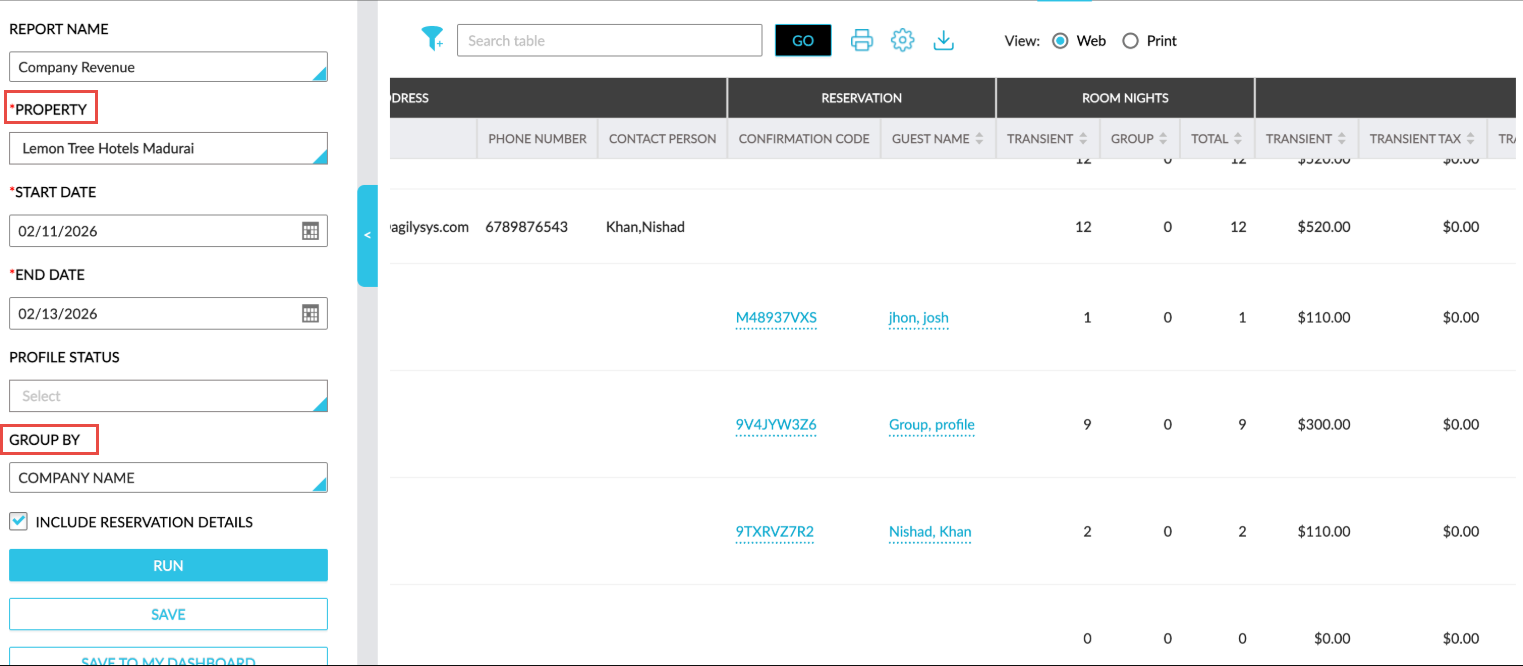
A new mandatory multi-select drop-down list, Property, has been added as a report generation parameter. The current property is selected by default. Users can select the preferred properties for report generation.
-
A new single-select drop-down list, Group By, has been added as a report generation parameter. This field displays the following options:
-
Company Name
-
Account Owner
-
|
Field |
Description |
|---|---|
|
Company Name |
When selected, the records in the generated report are grouped based on the company name. An accordion is displayed for each company name that displays the company profile name as a hyperlink when expanded. When users click on the hyperlink and when a single property is selected, they will be navigated to the profile in the currently logged-in property. When multiple properties are selected, the hyperlink will be displayed but on clicking the hyperlink, users will be redirected to the company profile in the currently logged in property. |
|
Account Owner |
When selected, the records in the generated report are grouped based on the account owner name. An accordion is displayed for each account owner where the account name is displayed in the following format when expanded: Last Name, First Name. When no account owner is assigned to a company profile, the value, Unassigned, is displayed. |
-
A new column, Property Name, has been added that displays the property name. Users can filter records in the generated report using this value.