Enhancements to Reservations Report (Dynamic)
The following options are added to the Reservations Report (Dynamic) to allow users to sort the records in ascending or descending order of the guest’s last name or the room number assigned to the reservations:
-
Sort By: This is a drop-down list that displays the following options:
-
Last Name: When selected, the records are sorted based on the guest’s last name.
-
Room Number: When selected, the records are sorted based on the room number assigned to the reservations.
-
-
Sort Order: This is a drop-down list that displays the following options:
-
Ascending: When selected, the records are sorted in ascending order of the option selected in the Sort By drop-down list.
-
Descending: When selected, the records are sorted in descending order of the option selected in the Sort By drop-down list.
-
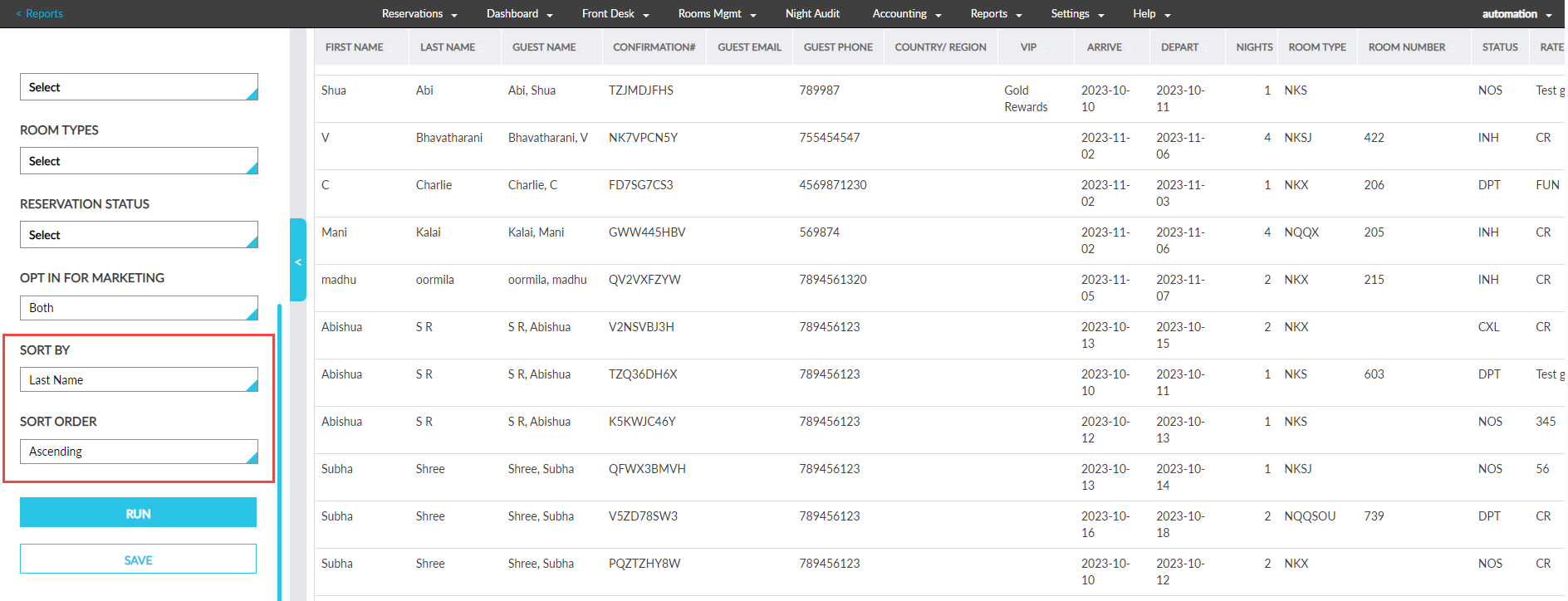
Users can save the generated report in the User Favorites section or download the report as a CSV or PDF file with the selected options. When users access the report from the User Favorites section or view the downloaded file, the records will be displayed based on the sort options selected.
For example, if a user saved the report with Sort By option selected as Last Name and Sort Order selected as Ascending, when accessing the saved report, the records will be displayed sorted by the guest’s last name in ascending order.