Manage Comments for Travel Agent Profiles
Stay is enhanced to allow users to store instructions for travel agent profiles as comments in the profile and display them in the reservations and groups associated with the profile. This enhancement is also applicable to the travel agent profiles that are managed through the Centralized Travel Agency Commission system (CTAC). For these restricted profiles, the instructions received from the CTAC system and Amadeus CRS are saved as comments in the profile.
Contact Agilysys to configure the ACRS interface at the property.
Feature Setting
The following feature setting has been introduced to allow users to choose to display the comments for a travel agent profile in the reservations and groups associated with the profile:
-
Name: Display travel agent comments
-
Comments: License is not required
Comments for Unrestricted Travel Agent Profiles
A new section, Comments, has been added to the travel agent profiles. When users click the Add Comment option, the Add a Comment pop-up screen appears that allows users to add and save the comments for the profile.
When the Display travel agent comments feature setting is enabled, users can select the following options in the Add a Comment pop-up screen:
-
Display Comment in Reservation checkbox: When selected, the comment is displayed in the Comments section of the reservation associated with the profile.
-
Display Comment in Group checkbox: When selected, the comments are displayed in the Comments section of the groups associated with the profile.
-
Remind Me Later flag: When enabled, the created comment is displayed as an alert each time the reservation associated with the profile is opened.
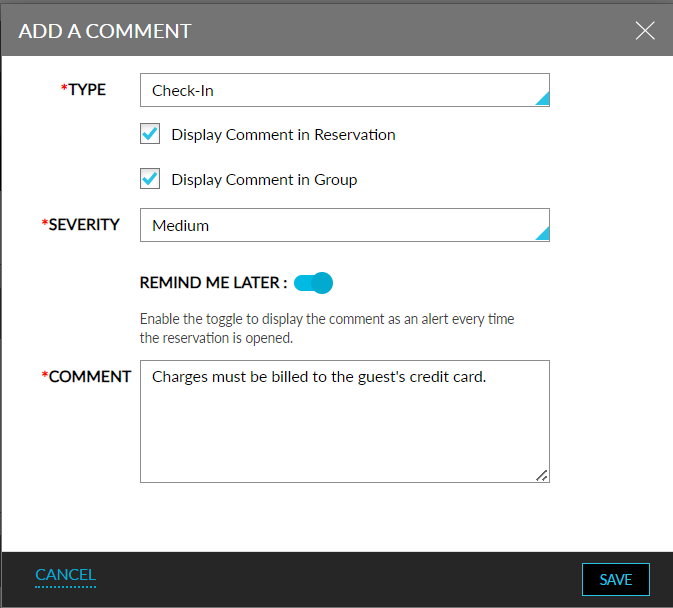
The created comments are displayed in the Comments section of the travel agent profile. When the feature setting is disabled, the mentioned options cannot be selected/modified in the Add a Comment and Edit Comment pop-up screens.
Comments for Restricted Travel Agent Profiles
For restricted travel agent profiles, the instructions received from CTAC and ACRS are saved as comments in the Comments section of the profile. These comments are displayed with a CTAC label. For restricted travel agent profiles, the Add Comment option is disabled for selection. Users cannot add a comment for these profiles from Stay. However, the display options selected for the comments can be modified.
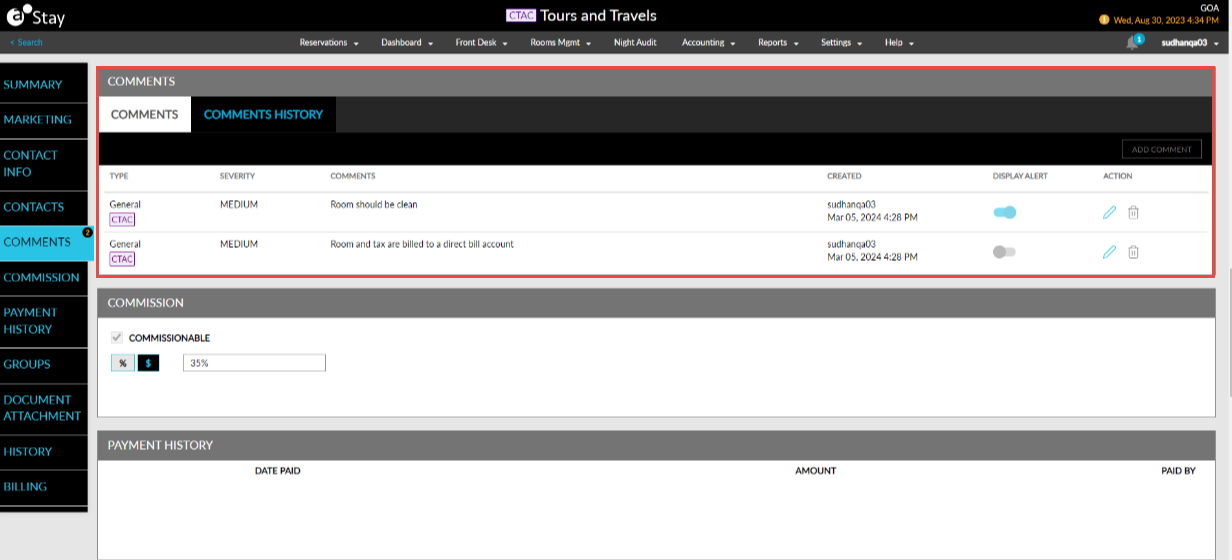
When users select the Edit option, users can enable/disable the following options for the comments in the Edit Comment pop-up screen when the Display travel agent comments feature setting is enabled:
-
Display Comment in Reservation checkbox
-
Display Comment in Group checkbox
-
Remind Me Later flag
-
Display Comment in Billing Instruction flag
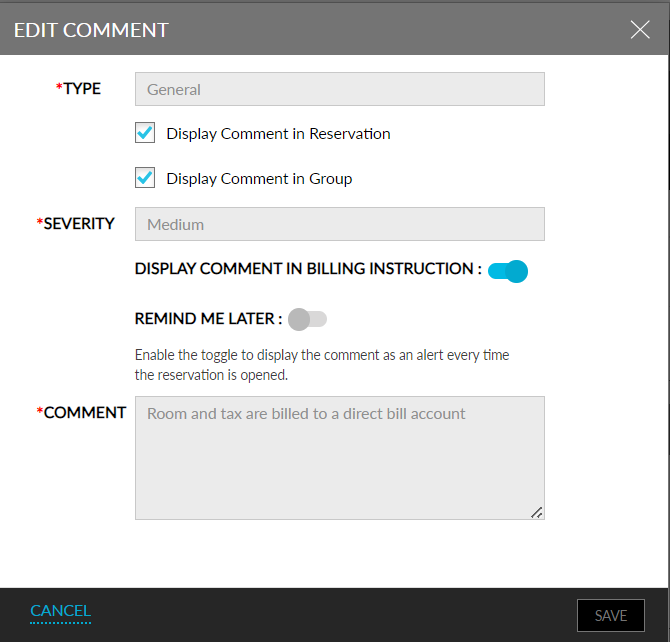
When the feature setting is disabled, the mentioned options cannot be modified. The comments saved for the restricted travel agent profiles are displayed with a CTAC label in the Comments section of the reservations and groups associated with the profile and cannot be edited or deleted. The Edit and Delete options for these comments are disabled for selection.
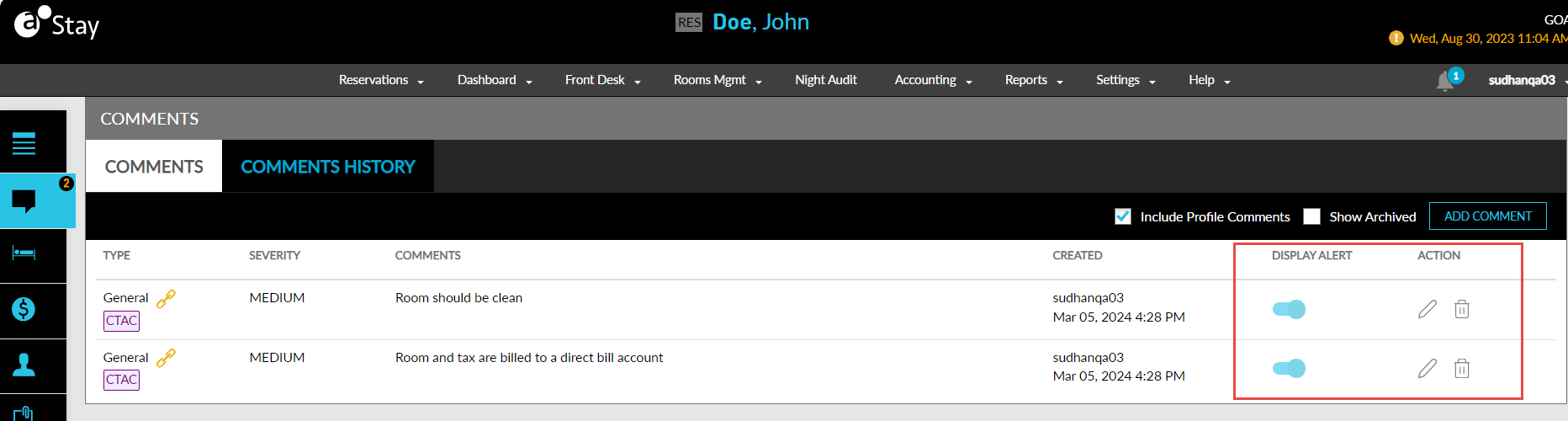
When users select the Edit option for the comment, only the Display Comment in Billing Instruction flag can be enabled/disabled in the Edit Comment pop-up screen. The other details cannot be modified.
When users enable the Display Comment in Billing Instruction flag in the Edit Comment pop-up screen, the comments are displayed in the Billing Instructions section of the travel agent profile with the CTAC label.
Users can choose to dismiss the alerts displayed for a reservation by disabling the Dismiss flag displayed in the Reservation Alerts pop-up screen for the reservation. When disabled, the comments will no longer be displayed as alerts when users open the reservation.
System Changes
To support this enhancement, a new section, Comments, has been added to the travel agent profiles that displays the comments configured for the profiles. A new section, Billing Instructions, has been added to the restricted travel agent profiles that display the comments that are configured to be displayed in this section.