Modifications To Payments Using Gift Cards
Stay is enhanced to display the gift card balance as a part of the payment workflow. Previously, when the user attempted to make a partial payment using a gift card, only the amount entered was displayed. Now, users can view the current gift card balance in the info message in the Make Payment screen and the Cancel Reservation screen.
For example, A reservation folio has a charge of $100. User selects the payment type as gift card with balance of $50. Since the gift card balance is less than the folio charge, $50 is deducted from the gift card and the following info message is displayed, Partial payment - $50 collected. Gift card balance reached its limit. Pay remaining balance using a different payment type.
Users can choose to pay the remaining balance with a different payment method. Refer to the screen below.
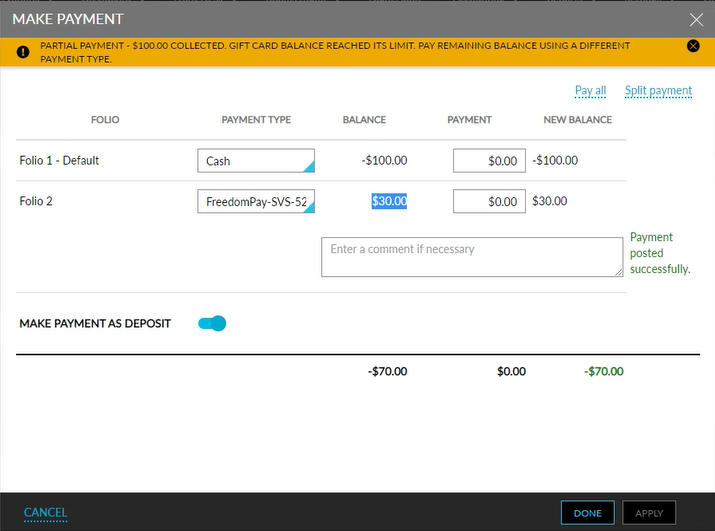
When a user tries to cancel a reservation using a gift card with insufficient balance the following toast message is displayed in the Cancel Reservation screen, Gift card balance - XX. Insufficient balance, change the payment type to proceed.
Users will not be able to proceed with the cancellation. The Pay & Confirm Cancellation button gets disabled. Refer to the screen below.
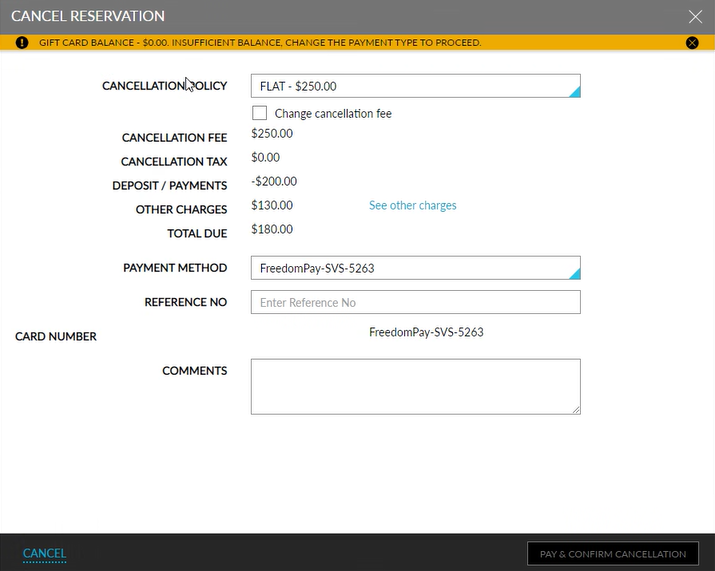
This feature is applicable for all gift cards integrated with Stay, which include:
-
Givex
-
Shift4
-
Agilysys Gift Cards
-
Stored Value Solutions (SVS)