Release 12.4
Display Guest/Account Name for A/R Invoices
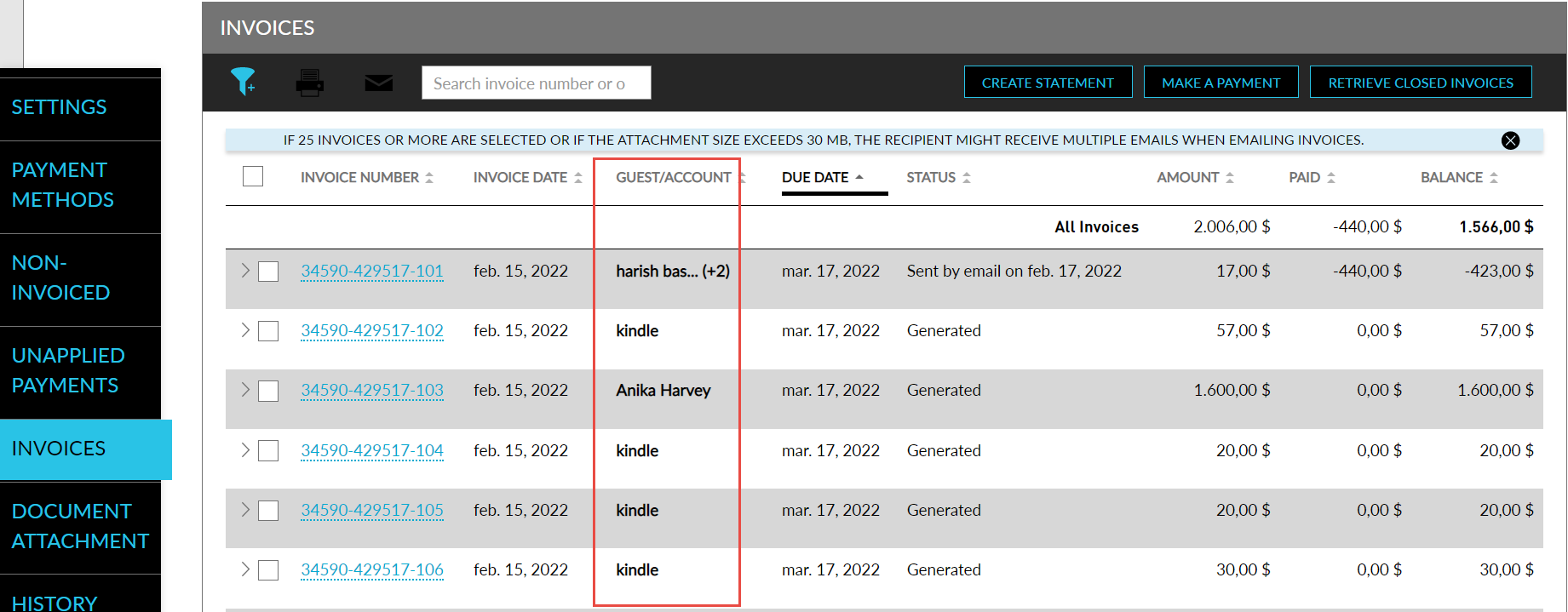
Stay is enhanced to display the guest name, or group name, when A/R Invoices are created. This allows users to easily identify the invoices created for a particular guest and make payments.
When an invoice is created by source account, the guest/account name is displayed. When a consolidated invoice that contains multiple accounts is generated, the primary guest name of the first source account followed by an ellipsis, and the number of additional guests/accounts within brackets is displayed. For example, Doe, John…(+2), here, John, Doe is the primary guest of the first invoice, and +2 indicates that there are two other invoices under the source account. When users hover over the additional accounts indicator, the entire list of accounts is displayed.
The group name is displayed for invoices that contain charges posted from groups. For invoices that contain charges posted from group reservations, the guest name associated with the reservation is displayed.
To support this enhancement, a new column, Guest/Account, is added to the Invoices section of the Accounts Receivable screen, and the Make Payment screen. The guest/account name is also displayed when the invoices are emailed, or printed, and when statements are generated for the invoices.