Restrict Users from Modifying Redemption Reservations
Stay is enhanced to restrict users from modifying redemption reservations or reservations for which offers were redeemed. The following details of reservations created using rate plans/packages for which offers were redeemed are restricted:
-
Arrival date
-
Departure date
-
Market Segment and Source of Business
-
Nightly room rate
-
Rate plan used
-
Room type
-
Associating the reservation to a different guest profile
-
Moving the reservation to a different property
Redemption reservations can have offers redeemed for a single night or for the entire duration of stay. They are created and sent to Stay through ACRS. Through this enhancement, users are restricted from modifying the redemption reservations in the following statuses:
-
Reserved
-
Arriving
-
In House
-
Departing
Feature Setting
The following new feature setting has been added to restrict users from modifying the mentioned details of redemption reservations:
-
Name: Redemption Reservation Restrictions
-
Comments: License is not required
Permission
The following new permission must be assigned to users to enable them to modify the mentioned details of redemption reservations:
-
Stay_OverrideRedemptionRestriction
This permission is assigned to the following roles by default:
-
System Administrator
-
Stay Hotel Manager
When this permission is not assigned to the logged-in user, the mentioned details of redemption reservations will be disabled and cannot be modified.
Modify Arrival Date
Users without the Stay_OverrideRedemptionRestriction permission are restricted from modifying the arrival date of a redemption reservation for which an offer is redeemed for a single night or the entire duration of stay from the following screens:
-
Reservation ➜Reservation Summary ➜Arrival date picker
-
Modify Stay ➜Reservation Details ➜Arrival date picker
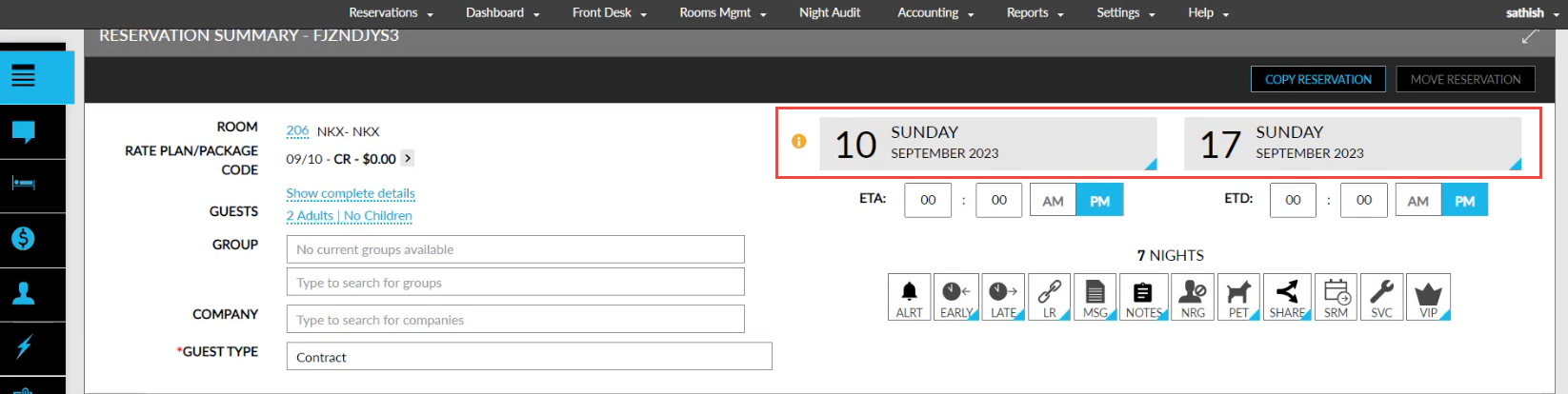
An info icon has been added next to the Arrival date picker in the mentioned screens. The following message is displayed when users hover over the icon: Redemption reservation restriction.
Modify Departure Date
Users without the Stay_OverrideRedemptionRestriction permission are restricted from modifying the departure date beyond the original date of a redemption reservation for which an offer is redeemed for a single night or the entire duration of stay. For example, consider a reservation for the dates 10th May 2024 to 15th May 2024, for which an offer is applied on 13th. In this case, the departure date cannot be modified beyond the original date, 15th.
Users can modify the departure date to a date that is prior to the original departure date. However, the modified date must not have an offer applied, or cannot be prior to the date for which an offer is applied. For example, consider a reservation created from 10th May 2024 to 15th May 2024 with an offer applied on 13th. For this reservation, users can modify the departure date to 14th but not to 13th since an offer is applied on 13th. Also, the departure date cannot be selected as 11th or 12th since these dates are prior to 13th for which an offer is applied.
Users are restricted from modifying the departure dates from the following screens:
-
Reservation ➜Reservation Summary ➜Departure date picker
-
Modify Stay ➜Reservation Details ➜Departure date picker
Modify Market Segment and Source of Business
Users without the Stay_OverrideRedemptionRestriction permission are restricted from modifying the Market Segment and Source of Business values for a redemption reservation for which an offer is redeemed for a single night or the entire duration of stay from the following screens:
-
Reservation ➜Reservation Summary ➜Reservation Details
-
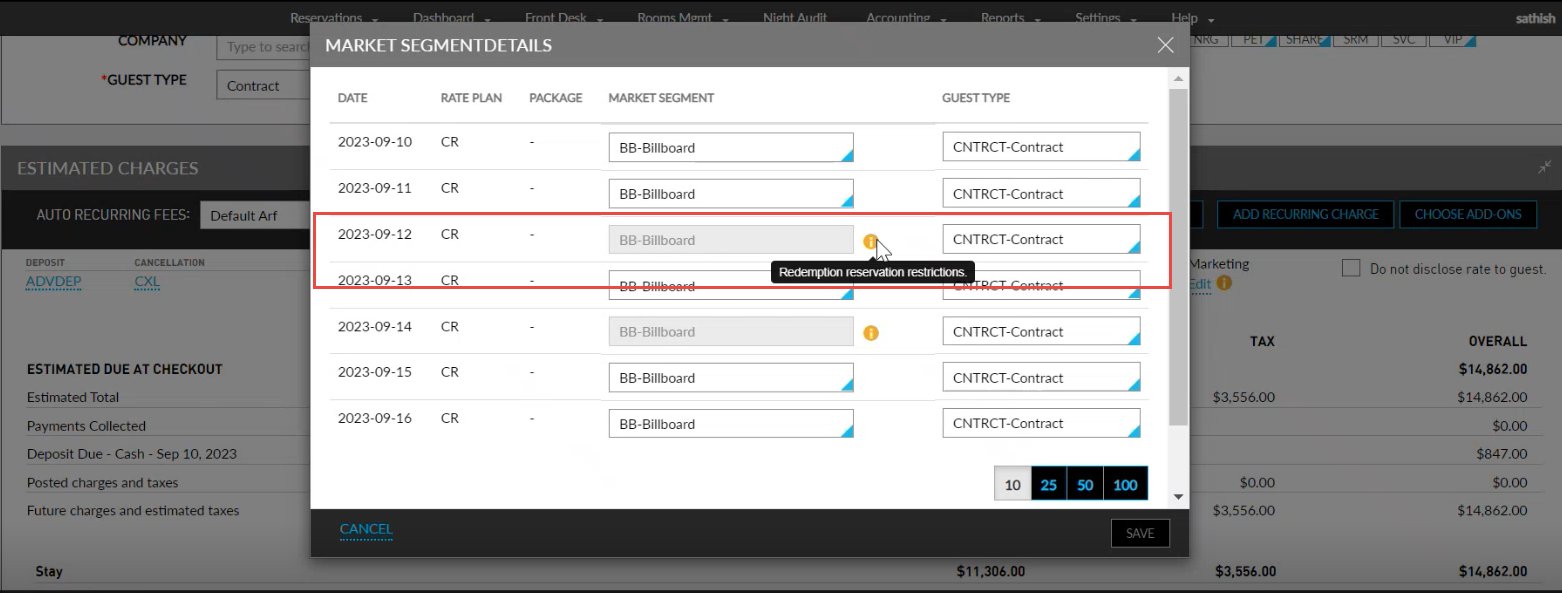
Reservation ➜Estimated Charges ➜Marketing ➜Edit ➜Market Segment & Guest Type Details
In these screens the Guest Type drop-down list will only display the guest types that are associated to the selected market segment. The market segment values can be updated for each night of stay in the reservation. In this case, users are only allowed to modify the market segment values for the nights for which an offer is not applied. An info icon has been added to the mentioned screens that displays the following message when hovered over: Redemption reservation restriction.
When users modify the market segment and source of business values from the Batch Operations screen (Front Desk ➜ Batch Operations ➜ Batch Edit ➜ More ➜ Update Source), if any of the selected reservations has an offer applied, the following message is displayed in the Edit Marketing Information pop-up screen and the guest type, market segment, and source of business values are not modified for the reservation: Reservations with award night(s) will not be updated.
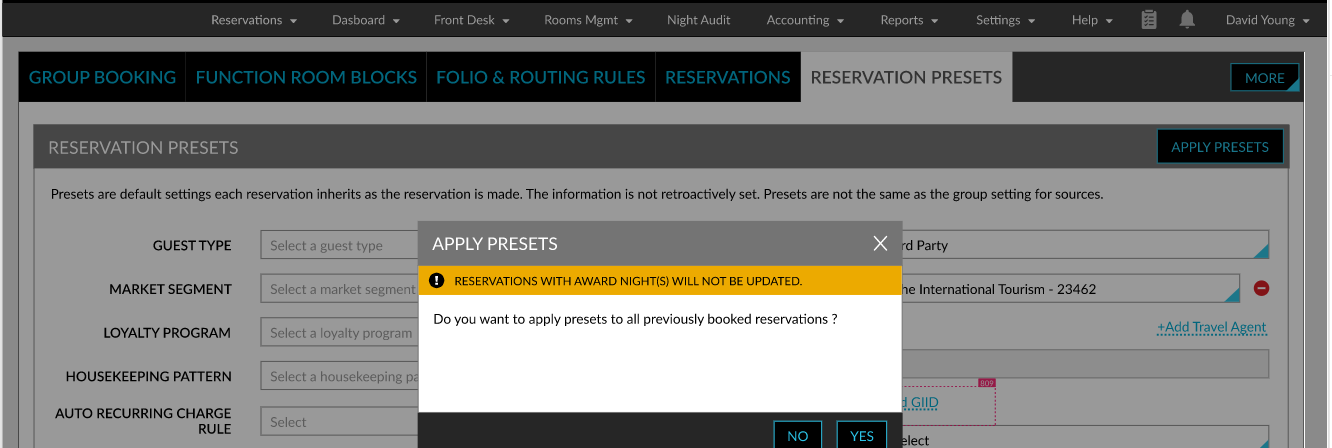
When users modify the market segment and source of business values for a group master from the Reservation Presets tab (Group ➜ Reservation Presets), and apply the modified values to previously created reservations using the Apply Presets option, the following message is displayed in the Apply Presets pop-up screen: Reservations with award night(s) will not be updated and the market segment and source of business values are not updated for the reservation.
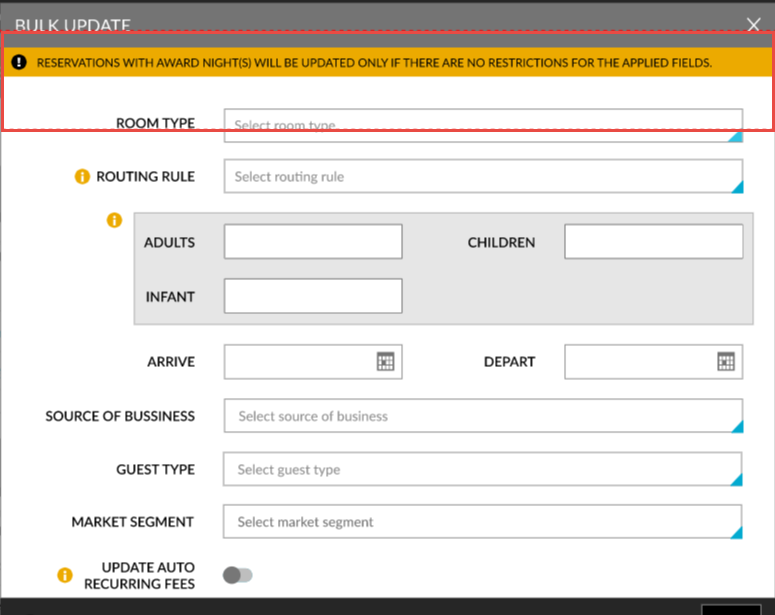
When users perform a Bulk Update for the market segment and source of business values of multiple group reservations (Group ➜ Reservations ➜ Bulk Update), if any of the selected reservation has an offer applied, the following message is displayed in the Bulk Update pop-up screen: Reservations with award night(s) will be updated only if there are no restrictions for the applied fields, and the guest type, market segment, and source of business values are not modified.
Modify Nightly Room Rate
Users without the Stay_OverrideRedemptionRestriction permission are restricted from modifying the nightly room rate of a redemption reservation for which an offer is redeemed for a single night or the entire duration of stay from the following screens:
-
Reservation ➜ Estimated Charges
-
Modify Stay
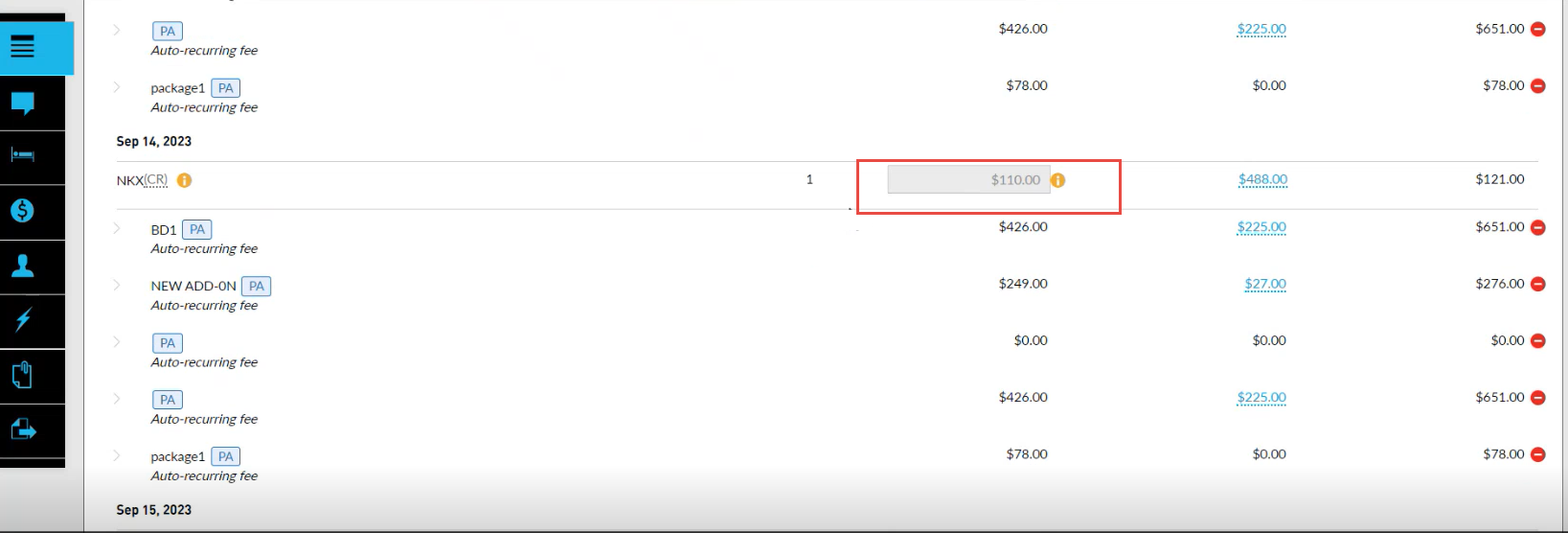
The rates for the nights for which an offer is applied are greyed out and cannot be modified. An info icon has been added next to these dates that displays the following message when hovered over: Redemption reservation restriction.
For shared reservations, when users select the Select All checkbox in the Share Reservation screen, the reservation with offer applied will not be selected. These reservations are disabled for selection and the following options cannot be applied to these reservations:
-
Rate Split
-
Bulk Modify
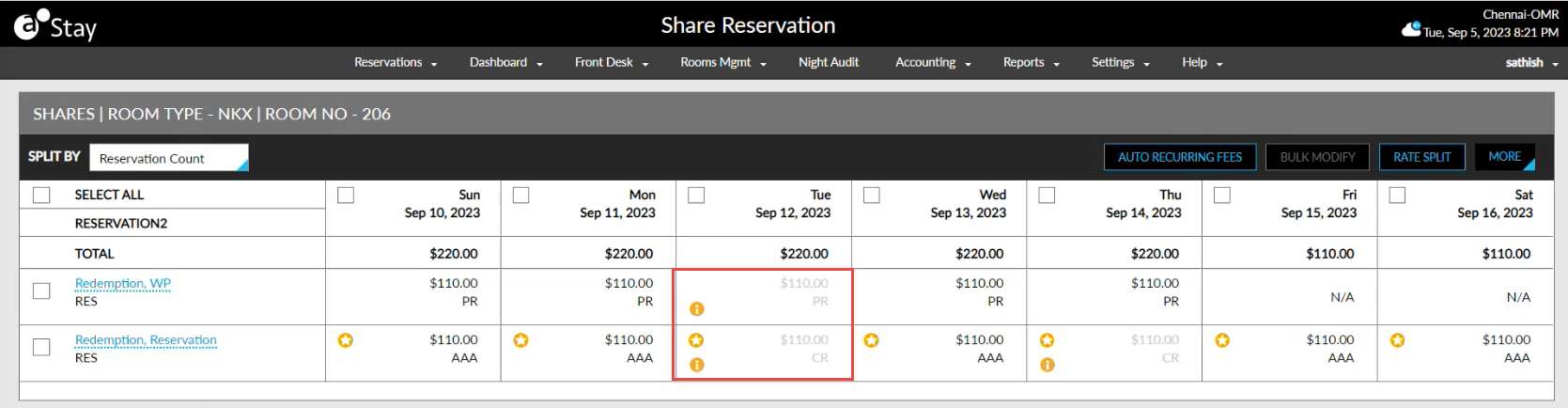
An info icon has been added next to the reservation with offer applied that displays the following message when hovered over: Redemption reservation restriction.
Modify Rate Plan
Users without the Stay_OverrideRedemptionRestriction permission are restricted from modifying the rate plan for the night for which an offer is applied from the following screens:
-
Reservation ➜ Estimated Charges
-
Modify Stay
The rate plan for the night of stay is disabled and cannot be modified. An info icon has been added next to the rate plan that displays the following message when hovered over: Redemption reservation restriction.
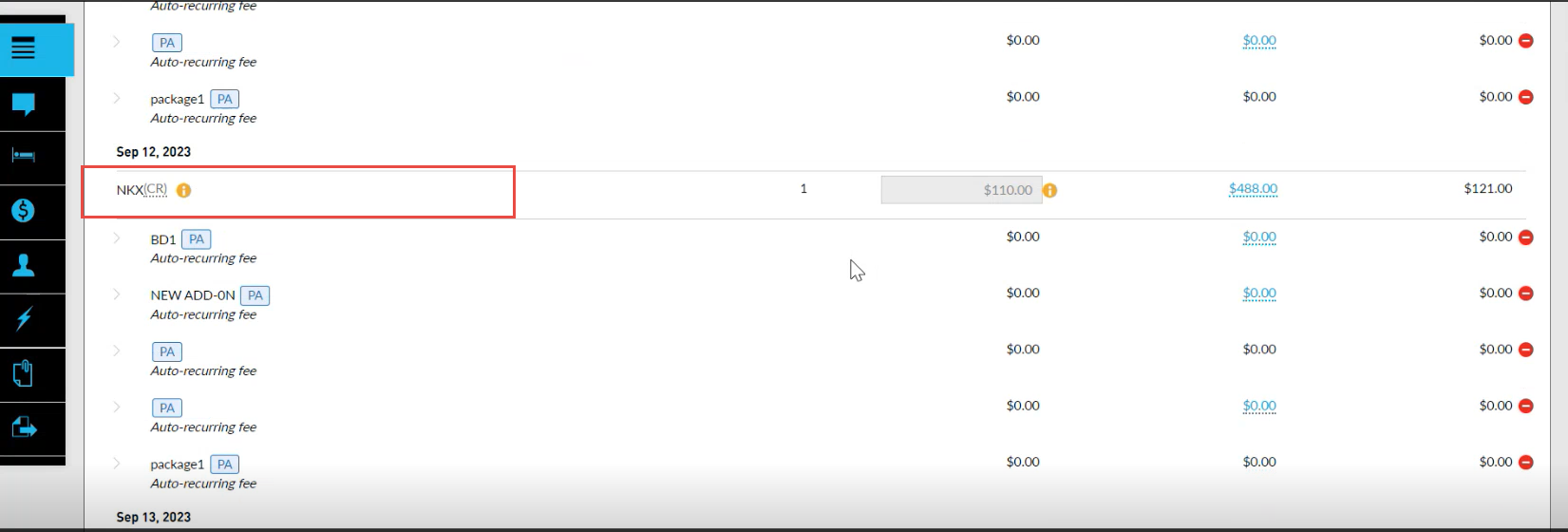
For shared reservations, the rate plan cannot be modified for the reservation for which an offer is applied.
Modify Room Type and Room Number
The Change Room Type option (Reservation ➜ Currently Selected Room ➜ Change Room Type) will be disabled for a reservation for which an offer is applied. An info icon has been added next to this option that displays the following message when hovered over: Redemption reservation restriction. When the Scheduled Room Move feature setting is disabled, the Change Room Type option will be enabled but the user will not be able to modify the room type for the reservation.
When users try to change the room number for a reservation with offer applied using the Change Room Number option (Reservation ➜ Currently Selected Room ➜ Change Room Number), the following message is displayed: Room type cannot be changed for award night(s). When the Scheduled Room Move feature setting is disabled, the Change Room Number option will be enabled but the user will not be able to modify the room number for the reservation.
When users try to assign a room number from a different room type for a reservation with offer applied from the Queue Rooms dashboard (Rooms Mgmt ➜ Housekeeping ➜ Queue Rooms), the following fields for the reservation are restricted from being modified:
-
Arrival date
-
Departure date
-
Room type
-
Rate plan
Associate to a Different Profile
For a reservation that has an offer applied, the Associate to a different profile option (Reservation ➜ Reservation Summary ➜ Guest Information) will be disabled and the reservation cannot be associated with a different guest profile. An info icon has been added next to this option that displays the following message when hovered over: Redemption reservation restriction.
Move Reservation to a Different Property
For a reservation that has an offer applied, the Move Reservation option will be disabled, and the reservation cannot be moved to a different property.