Send Bill Code Information to ACSC
The Stay - Advanced Casino System Corporation (ACSC) integration is enhanced to send the bill code information configured as part of a comp routing rule added to a reservation from Stay to ACSC.
Contact Agilysys to enable this feature for a property.
To support this enhancement, a new field, Bill Code, has been added to the Step 1: Rule Details section of the Add Routing Rule pop-up screen (Reservation ➜ Folios section ➜ Summary tab ➜ + Add account routing rule) that appears when users add a comp routing rule to a reservation. This field is displayed only when the ACSC interface is enabled for the property. This field accepts only alphabets and numeric values.
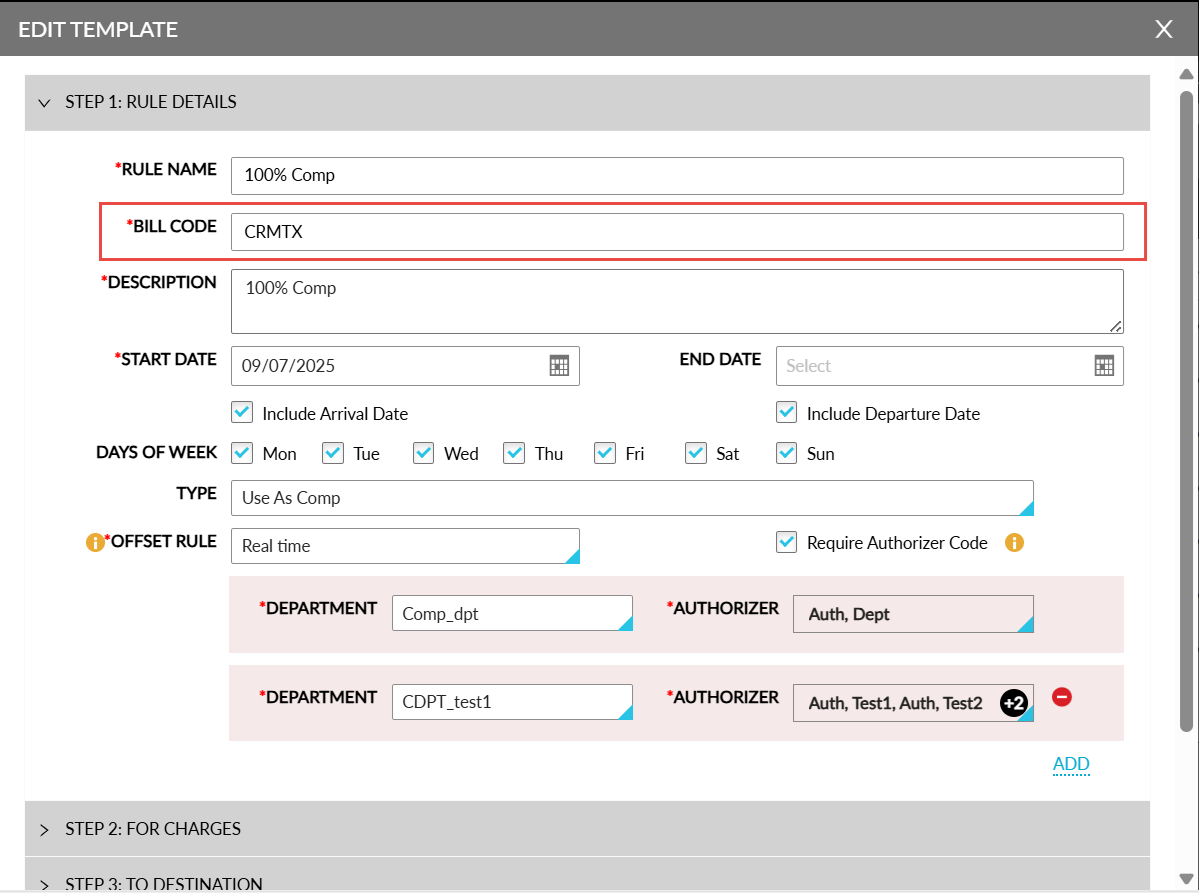
When a comp routing rule configured with a bill code is added to a reservation booked for a casino patron, the following actions are performed:
-
The Issue Player Comp message is sent from Stay along with the details of the routing rule added to the reservation which includes the bill code are sent from Stay to ACSC.
-
ACSC will pre-authorize the estimated comp amount, and a reference comp number is sent as a response from ACSC to Stay.
-
The routing rule will be successfully added to the reservation in Stay based on the response received from ACSC. The comp number received from ACSC will be used for further transactions between Stay and ACSC.
-
When the routing rule added is invalid as per the response received from ACSC, a message indicating the same is displayed in the reservation.
Settle Player Comp
The charges posted to Comp Folio as part of the routing rule will be sent to ACSC during the date roll. For example, for a 4-nights reservation, the Settle Player Comp message will be sent from Stay during the date roll to inform ACSC regarding the amount available in the Comp folio for every four nights.
ACSC will validate the comp amount and send a response to Stay. Stay displays the success and failure message received from ACSC as part of the API log. The date roll will be completed and not blocked in case any failure message is received from ACSC.
Reservation Check-Out
The charges available in the Comp Folio at the time of check-out will be sent from Stay to ACSC. ACSC will validate the amount received and send a response back to Stay. The success message received from ACSC will be displayed in the API logs.
When no charges are available in the Comp Folio at the time of check-out, the Settle Player Comp call will be triggered by Stay with the amount as $0.00.
Remove Routing Rule
When a routing rule is manually removed from a reservation, a Void Issue Player Comp message is sent from Stay to ACSC. ACSC provides a valid response to Stay to remove the routing rule associated with the reservation. When the duration of the reservation is extended or shortened, the Settle Player Comp message is sent from Stay for the valid days when comp is available as part of the routing rule.
Undo Check-Out
After a reservation is checked out, the routing rule associated with the reservation will be marked as closed by ACSC. When an undo check-out is performed, the existing rule will continue to be used to route the charges posted thereafter.