Stay - Comtrol Integration Enhancements
The following enhancements have been made to Stay - Comtrol integration:
Delete Unused Reference Numbers
The account reference number for a reservation is generated when the first Folio Information Response or POS Post Charge Response message is sent to Comtrol from Stay. After the date roll is completed for a property, a device cleanup operation is triggered from Comtrol. This cleanup operation detects and deletes the unused reference numbers associated with reservations, house accounts, company profiles, and groups from the database.
Additionally, a watchdog service task has been added in Stay that detects the expired account, guest profile, and reservation device reference numbers that were not deleted during the date roll. These reference numbers are then purged from the database.
Resync Requests for Multiple Devices
When a resync operation is requested for more than one device, the resync locks are released for a device when Comtrol responds to the Resync Start or Resync End messages with an Error message.
-
The resync locks are released only when the message indicating an error is generated by the last device in the list of devices being processed.
-
The resync locks are not released, and the next device is processed when the message indicating an error is not generated by the last device in the list of devices that require a resync.
Send Maid Code Messages in Batch
When the housekeeping conditions of rooms are updated in bulk during date roll, multiple maid code messages were sent for each room from Stay to Comtrol. Through this enhancement, the maid code messages will now be sent as a batch instead of individual messages.
Send Guest Profile Updates to Comtrol
When guest profiles are updated in Stay, the profile updates are sent from Stay to Comtrol in bulk instead of individual messages. Previously, the updates were for the profiles as individual messages.
Default DMM Field Value
The DMM field value in the inbound requests received from Comtrol will no longer be defaulted to null. Previously, the DMM field value was defaulted to null in Stay.
Query Reservation Details
Whenever the reservation details are queried in the device registry, first the device registry cache is searched. When the details are not present in the cache, then the Comtrol Fleet is searched.
Apply Length Restrictions Defined in the Device Registry
Users can now configure device-specific length restrictions in the device registry. The outbound messages sent from Stay to Comtrol that require one or more reference numbers adhere to the length restrictions defined in the device registry.
The excludedDmms field, which is a comma separated list of devices DMM values that must not be processed is sent in a message when the property requires reference numbers with different lengths. This is determined by accessing the property’s device registry cache. The complete list of devices available at a property is required by Stay to determine the devices that must be excluded from being processed in a message.
For example, consider a property that has the following devices: 777, 598, 111, 222, where device 777 supports up to 20-character account numbers, device 598 supports up to 7-character account numbers, and the lengths of devices 111 and 222 are unknown. Messages are sent to the devices by including the excludedDmms field as follows:
-
A Check-in Room message can be sent to device 598 with an account number that is 7 characters in length or less by specifying excludedDmms 777, 111, 222.
-
A Check-in Room message can be sent to device 777 with an account number that is 20 characters in length or less by specifying excludedDmms 598, 111, 222.
The includedDmms field is a comma separated list of devices DMM values that must be processed in a message. Devices that are not included in the list will ignore the message sent. This field is included in a message only when the property requires reference numbers with different lengths. This is determined by accessing the property’s device registry cache.
Resync/Reset Data
When the device registry reference number settings are configured for a property, the resync/reset data generation examines the device registry cache and sends the associated reference numbers based on the devices being synced.
-
The Resync Data messages must not contain the excludedDmms or includedDmms fields because they are tied to a specific device (each resync message has a dmm field (DFID 178)).
-
The Reset Data messages must set the excludedDmms or includedDmms fields to ensure that they target the desired device(s).
Capture Disabled Inbound Messages in Interface Logs
The following disabled inbound messages that do not require a response will now be visible in the device interface logs generated in Stay in the Appliance Log tab of the Health & Monitoring screen (Interfaces ➜ Health & Monitoring ➜ Appliance Log) with a warning indicating they are disabled.
-
Guest message delivered (32)
-
Maid code (17)
-
New message notification (36)
-
Post call charge (67)
-
Post charge (38)
Loyalty Field Support in Checkout, Guest Reservation and Room Move Messages
The Loyalty Level field is sent to Comtrol from Stay in the following messages:
-
Check-in room (14)
-
Checkout room (15)
-
Folio information response (25)
-
Guest name (93)
-
Guest reservation (06
-
Move room (18)
-
Resync data (80)
Previously, the Loyalty Level field was sent in the Check-In Room and Resync Data messages only.
Track Device Names in the Device Registry
The device registry of the property is enhanced to track the name of the devices. The device name defined for each DMM in the Device Registry tab of the On-Premise Settings screen (Interfaces ➜ On-Premise Settings ➜ Device Registry) is tracked in the device registry.
When Comtrol Fleet is configured for a property, the device friendly names of the devices received from Fleet will be automatically tracked and displayed in the property’s device registry.
Send Date and Time Fields in UTC Time Zone
Stay is enhanced to send the date and time fields in the key creation requests in the UTC time zone. Previously, these fields were sent based on the property’s time zone.
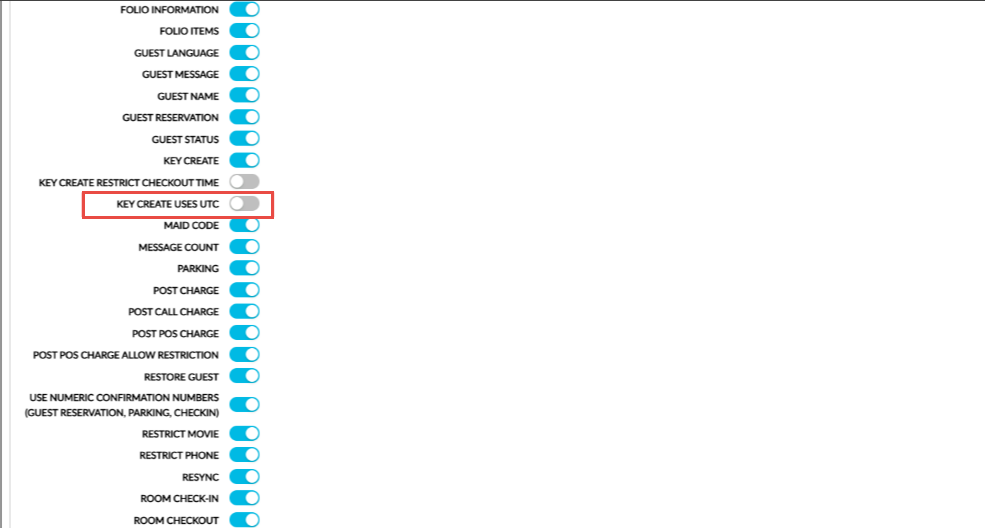
To support this enhancement, a new checkbox, Key Create Uses UTC, has been added to the On-Prem Device section of the Comtrol interface (Interfaces ➜ Cloud Settings ➜ Settings ➜ Comtrol). This checkbox is not selected by default.
-
When this checkbox is selected, the date and time fields in the key creation requests are sent in the UTC time zone.
-
When this checkbox is not selected, the date and time fields in the key creation requests are sent in the property’s time zone as per the existing functionality.
Adding Devices to the Property’s Device Registry
Stay is enhanced to allow users to add devices to the property’s device registry manually.
Permissions
The following existing permissions must be assigned to allow users to add devices manually:
-
WriteInterfaceConfig
-
Stay_ReadInterfaceConfig
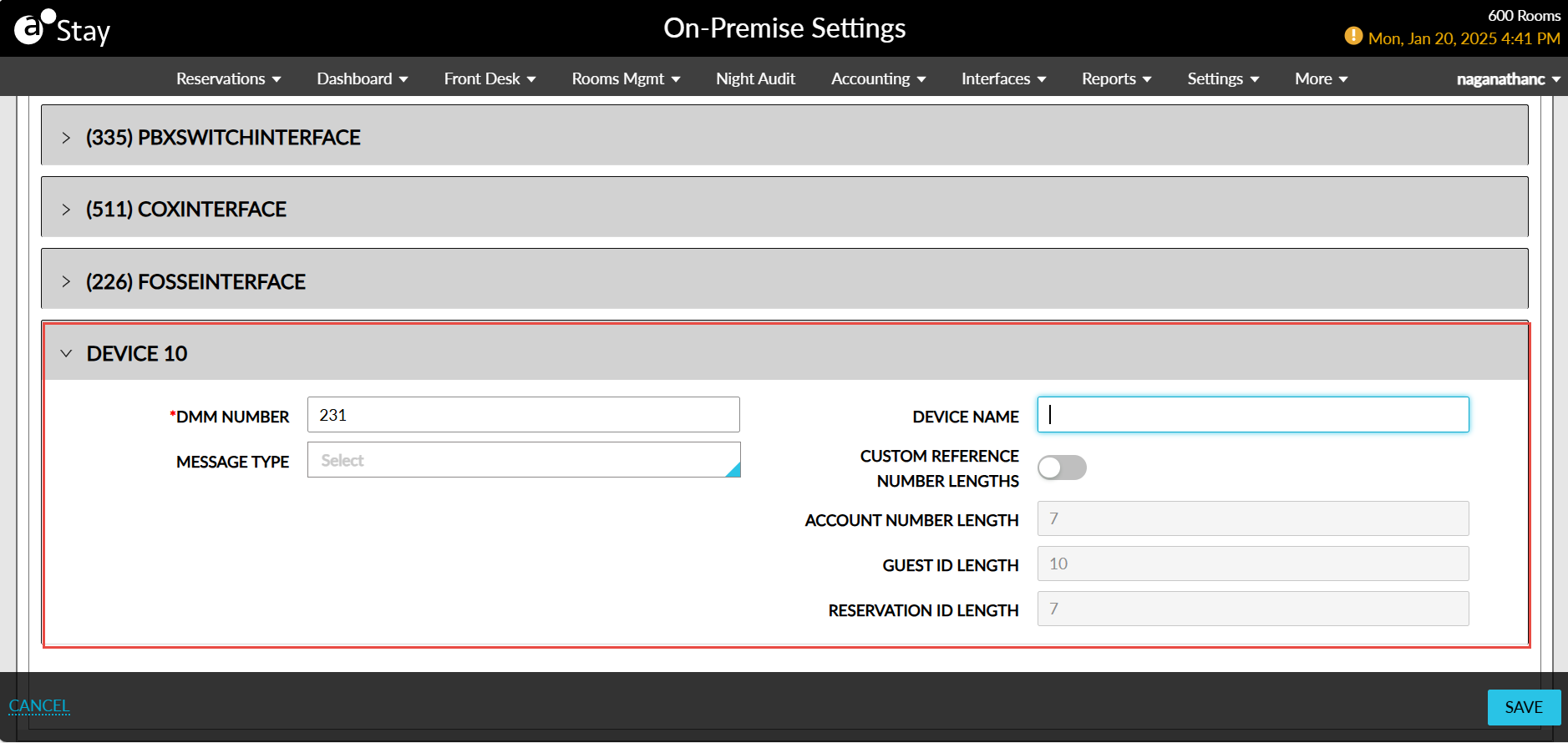
Users with the permissions assigned can add devices from the Device Registry tab in the On-Premise Settings screen (Interfaces ➜ On-Premise Settings ➜ Device Registry). When the Add button is clicked, a new section, Device X, is displayed where X denotes the count of the device being configured. The following fields are displayed in this section:
|
Field |
Description |
|---|---|
|
DMM Number |
This is a mandatory field that allows users to enter the DMM number of the device to be added. This field accepts a maximum of 3 numeric characters. |
|
Message Type |
This is an optional multi-select drop-down list that allows users to select the message types supported by the device. |
|
Device Name |
This is an optional field that allows users to enter the name of the device to be added. This field accepts a maximum of 64 characters. |
|
Customer Reference Number Lengths |
This is an optional flag that must be enabled to allow users to configure device-specific lengths in the following fields. |
|
Account Number Length |
This is an optional field that allows users to configure the length of the account number for the device. By default, the value is set as 7. Users can modify this value only when the Customer Reference Number Lengths flag is enabled. A minimum value of 7 can be entered when guest message is configured, otherwise the value 5 can be entered. The maximum value that can be entered is 18. The length cannot be equal to the length of the charge posting ID. |
|
Guest ID Length |
This is an optional field that allows users to configure the guest ID length. By default, the value is set as 10. Users can modify this value only when the Customer Reference Number Lengths flag is enabled. A minimum value of 10 can be entered when guest message is configured, otherwise the value 6 can be entered. The maximum value that can be entered is 18. |
|
Reservation ID Length |
This is an optional field that allows users to configure the length of the reservation ID. By default, the value is set as 7. Users can modify this value only when the Customer Reference Number Lengths flag is enabled. A minimum value of 7 can be entered when guest message is configured, otherwise the value 6 can be entered. The maximum value that can be entered is 18. |
When Comtrol Fleet is configured for a property, users cannot add devices to the registry manually. In this case, the device will be added to the registry automatically whenever a new message with a new DMM is received by the property from the device through Comtrol.