In House Guest List Details
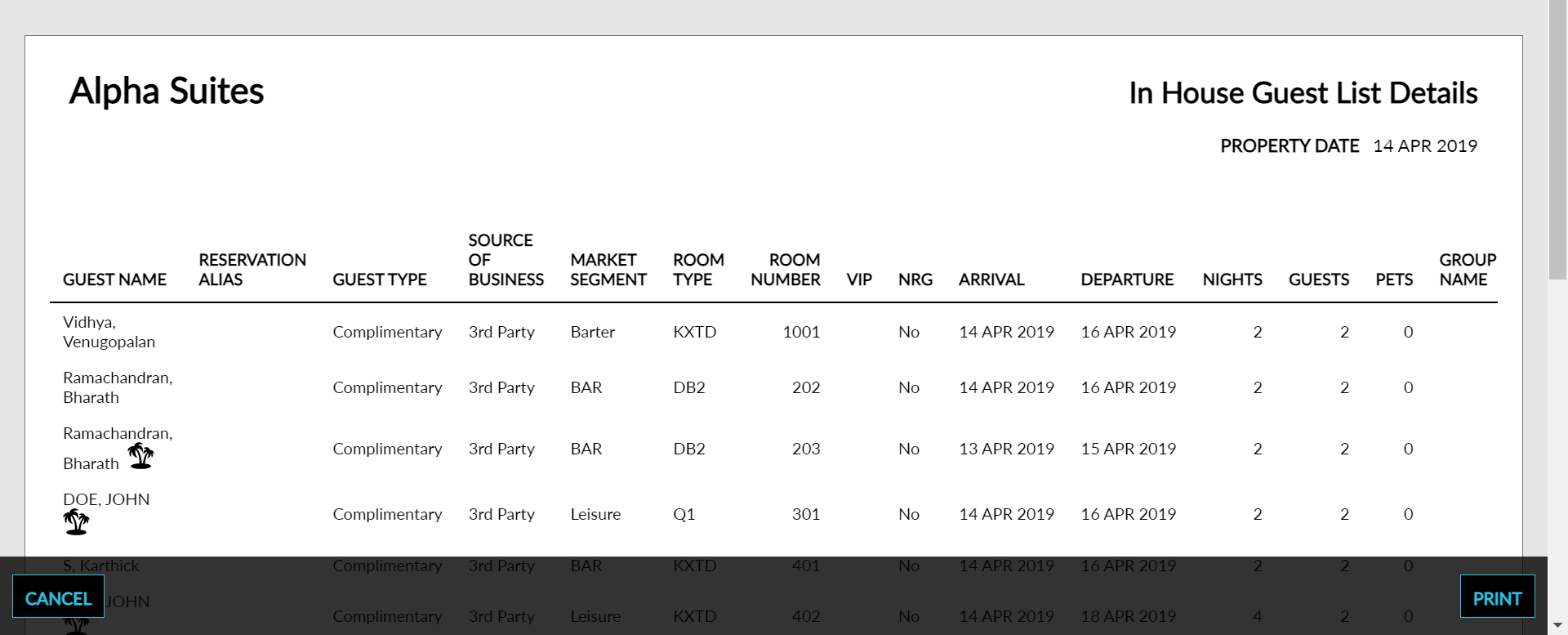
The In House Guest List Details report allows users to view data about in-house guests. As a property manager, user can reference the list in case of an emergency or to confirm VIP guests. If a package rate plan is associated with the reservation, it appears on the report with a palm tree icon.
Perform the following steps to generate the report:
Navigate to Reports ➜ All Reports ➜ In House Guest List Details (under Manager).

Select Guest Type if you want the report to be generated based on the guest type or select Market Segment if you want the report to be generated based on the market segments.
Click Generate. The report with the selected data appears.
Click Print to send a copy of the report to the printer.
Sample Report
Report Parameters
This report displays the following parameters:
|
Field |
Description |
|---|---|
|
Guest Name |
The name of the main guest for each reservation. |
|
Reservation Alias |
The reservation alias associated with the reservation. |
|
Guest Type |
The guest type associated with the reservation. |
|
Source Of Business |
The source of business associated with the reservation. |
|
Market Segment |
The market segment associated with the reservation. |
|
Room Type |
The type of room that the guest has reserved. |
|
Room Number |
The room number that the guest is staying in, if assigned. |
|
VIP |
The VIP status of the guest. |
|
NRG |
Identifies whether a non-registered guest is on the reservation. |
|
Arrival |
The arrival date for the reservation. |
|
Departure |
The departure date for the reservation. |
|
Nights |
The number of nights that the guest is staying for the reservation. |
|
Guests |
The total number of reservations arriving on each date. |
|
Pets |
The total number of pets arriving on each day. |
|
Group Name |
The group name associated with the reservation if one applies. |