Configure Early Check-In and Late Check-Out Time for Add-Ons
Users can configure the early check-in and late check-out time for the add-ons available at the property. Users can configure these times when creating an add-on. When an add-on configured with an early check-in and late check-out time is added to a reservation, the early check-in and late check-out time of the add-on will be applied to the reservation.
For example, let us assume an add-on, Breakfast, configured with an early check-in time 11AM is added to a reservation booked at a property where the check-in time is 12PM. In this case, the early check-in time of the add-on will be applied to the reservation, that is, the early check-in time of the reservation will be updated as 11AM.
Feature Setting
The following feature setting must be enabled for users to configure the early check-in and late check-out time for add-ons:
-
Name: Early Check-In and Late Check-Out for Add-Ons
-
Value: Must be enabled
-
Comments: License is not required
Permission
The following permissions must be assigned to enable users to configure the early check-in and late check-out time for add-ons:
-
Stay_ManageEarlyCheckInTime
-
Stay_ManageLateCheckOutTime
These permissions are provided to the following roles by default:
-
System Administrator
-
Stay Hotel Manager
-
Stay Accounting
-
Accounts Receivable Manger
When the feature setting is enabled, users can configure the early check-in and late check-out time when creating/modifying add-ons in the Early Check-In and Late Check-Out fields in the Edit Add-Ons and Add a New Add-Ons screens (Settings ➜ Rates ➜ Add-Ons ➜ Add New/Edit). This is an optional field that allows users to configure the time based on the time format used by the property.
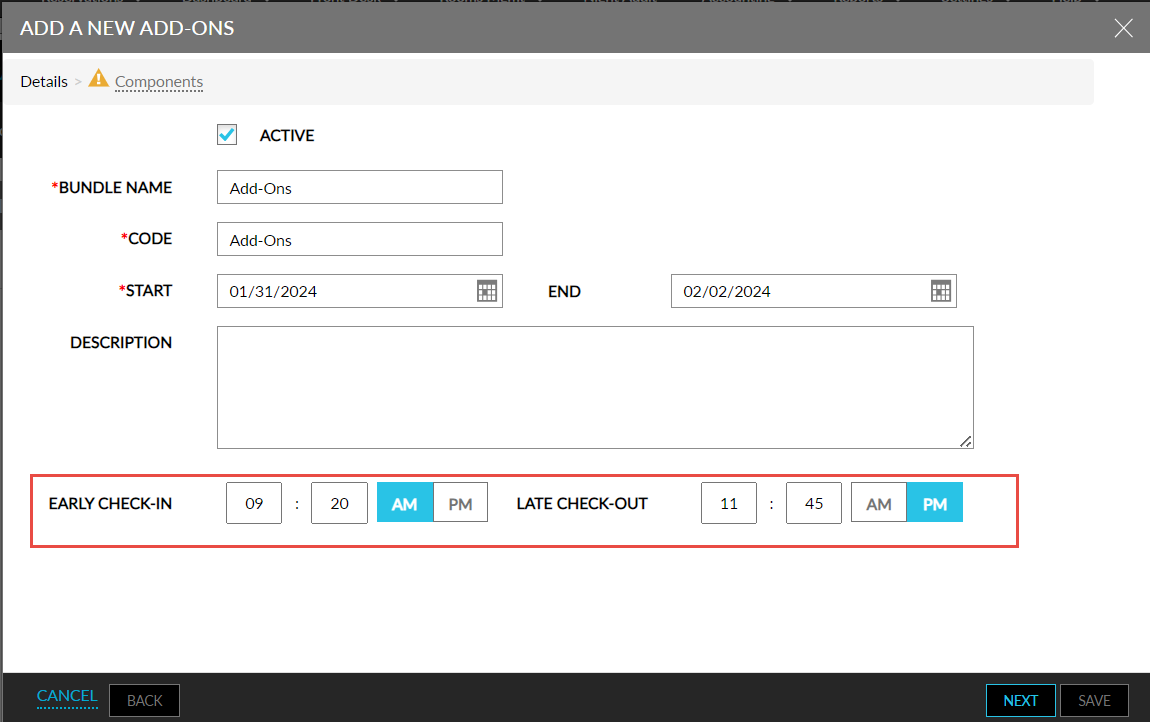
The configured time is displayed in the Early Check-In and Late Check-Out columns in the Add-Ons tab of the Rates screen. These columns are left blank when users do not configure the early check-in and late check-out time for the add-ons.
Add Add-Ons to Reservations
When users choose an add-on bundle for a reservation with an early check-in and late check-out time, the configured time is applied to the reservation. The Early Check-In and Late Check-Out badges for the reservation are enabled and the configured time is updated.
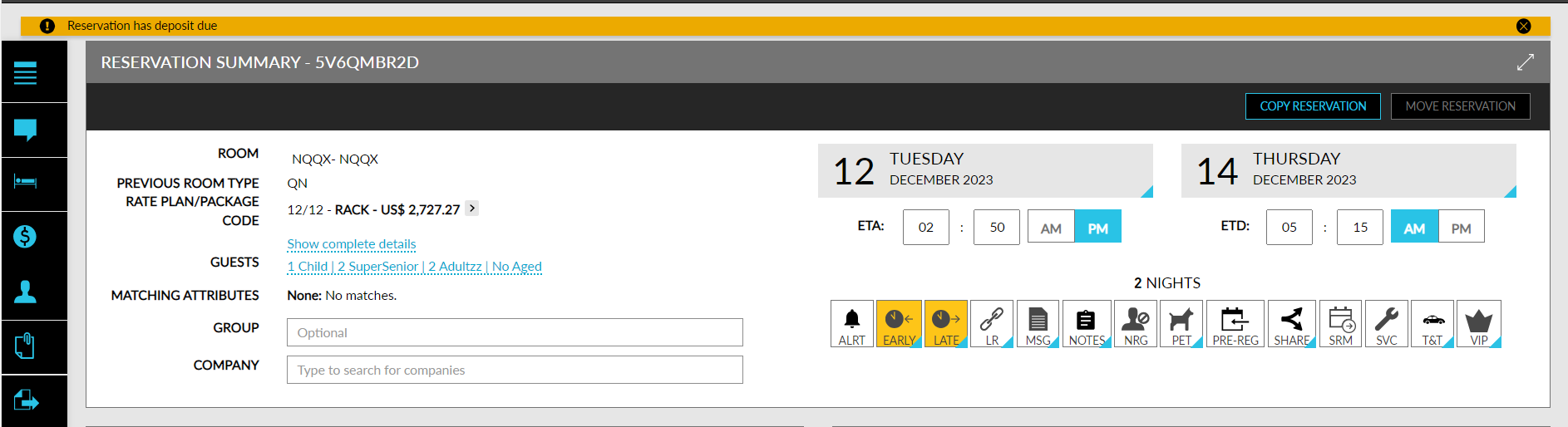
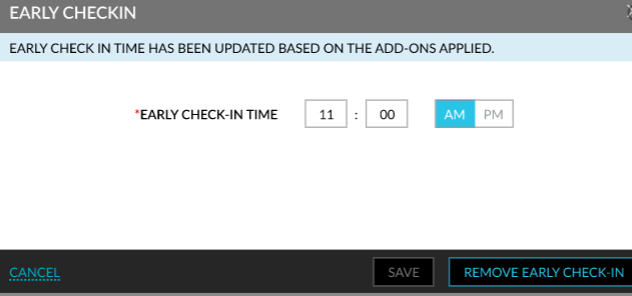
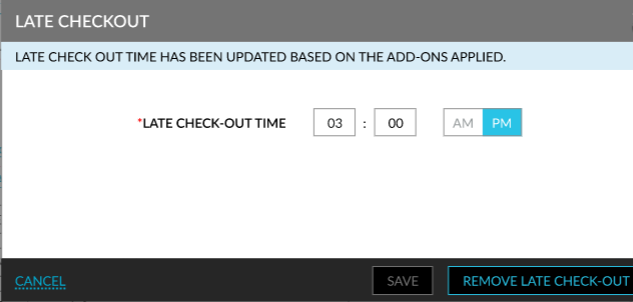
The key expiration time in the Keys section of the reservation is updated with the late check-out time configured for the selected add-ons.
Modify Early Check-In and Late Check-Out Time of Add-Ons
Users can override and modify the early check-in and late check-out time applied to a reservation by the add-on bundle.
Users with the Stay_ManageEarlyCheckInTime permission can update the early check-in time by clicking the Early Check-In badge. When users update the time and click Save in the Early CheckIn pop-up screen, the Authorize Action pop-up screen appears that prompts users to enter their credentials. The credential of the user is validated and if the user has the Stay_ManageEarlyCheckInTime permission, the early check-in time gets updated successfully.
If the user does not have the permission, the message, <Username> User does not have the required permission to update early check-in time, is displayed.
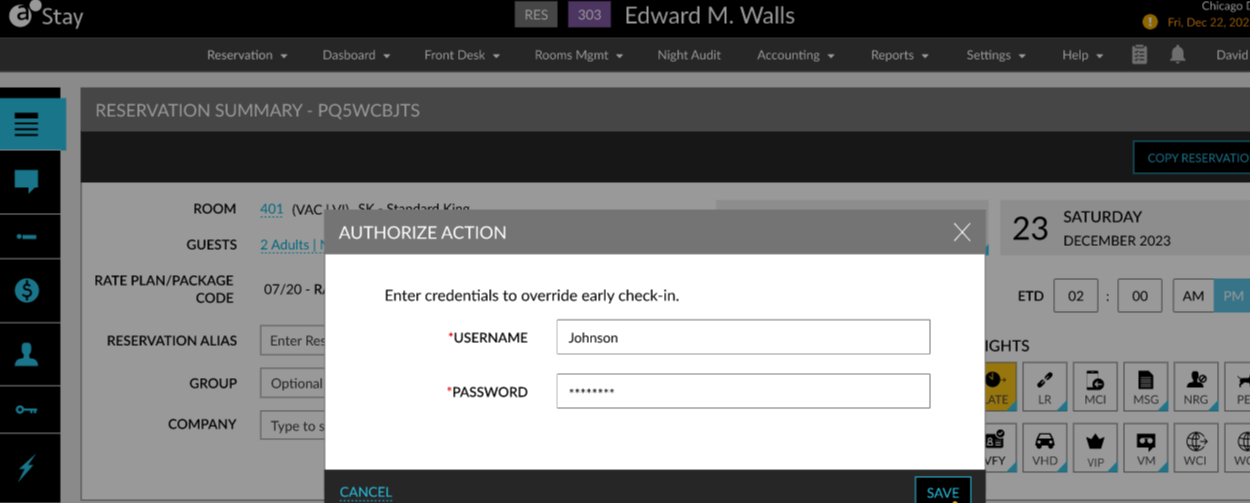
Users with the Stay_ManageLateCheckOutTime permission can update the late check-out time by clicking the Late Check-Out badge. When users with the required permissions update the time and click Save in the Late CheckOut pop-up screen, the modified time is updated successfully. When the logged-in user does not have the required permissions, the Authorize Action pop-up screen appears that prompts users to enter their credentials. The credentials of the user are validated and if the user has the Stay_ManageLateCheckOutTime permission, the late check-out time gets updated successfully.
If the user does not have the permission, the message, <Username> user does not have the required permission to update late check-out time, is displayed. The key expiration time is automatically updated when the late check-out time for the reservation is updated.
Remove Early Check-In and Late Check-Out Time of Reservations
Users can remove the early check-in and late check-out time applied to a reservation by the add-on bundle.
Users with the Stay_ManageEarlyCheckInTime permission can remove the early check-in time applied to a reservation by clicking the Remove Early Check-In option in the Early CheckIn pop-up screen. When clicked, the Authorize Action pop-up screen appears that prompts users to enter their credentials. The credential of the user is validated and if the user has the Stay_ManageEarlyCheckInTime permission, the early check-in time is removed successfully. If the user does not have the permission, the message, <Username> user does not have the required permission to update early check-in time, is displayed.
Users with the Stay_ManageLateCheckOutTime permission can remove the late check-out time applied to a reservation by clicking the Remove Late Check-Out option in the Late CheckOut pop-up screen. When clicked, the Authorize Action pop-up screen appears that prompts users to enter their credentials. The credential of the user is validated and if the user has the Stay_ManageLateCheckOutTime permission, the late check-out time is removed successfully. If the user does not have the permission, the message, <Username> user does not have the required permission to update late check-out time, is displayed.
The key expiration time is automatically updated when the late check-out time for the reservation is removed.
The following table lists the various scenarios in which the early check-in and late check-out time is updated for a reservation:
|
Scenario |
Action |
|---|---|
|
When add-ons with early check-in and late check-out time configured are added. |
The early check-in and late check-out time of the selected add-ons is applied to the reservation. |
|
When add-ons with early check-in and late check-out time configured are added after check-in. |
Only the late check-out time for the reservation is updated. |
|
When the early check-in and late check-out time is updated manually and then add-ons with early check-in and late check-out time configured is added. |
The early check-in and late check-out time is updated as per the add-ons added. |
|
When the early check-in and late check-out time is removed manually. |
The early check-in and late check-out time is removed for the reservation. |
|
When multiple add-ons with different early check-in and late check-out time is added. |
The earliest early check-in time and the latest late check-out time is updated for the reservation. |
|
When the add-ons with early check-in and late check-out time configured is deleted. |
The early check-in and late check-out time is removed for the reservation. |
|
For a reservation with multiple add-ons with different early check-in and late check-out time, when user deletes an add-on. |
The early check-in and late check-out time is updated as per the add-on which exists in the reservation. |
|
When add-ons with early check-in and late check-out time configured is added after the early check-in and late check-out time is manually overridden. |
The early check-in and late check-out time is updated as per the add-ons added. |
|
When add-ons with early check-in and late check-out time configured is added after the early check-in and late check-out time is manually removed. |
The early check-in and late check-out time is updated as per the add-ons added. |
|
When add-ons with late check-out time configured is added. |
The key expiration time is updated as per the add-ons added. |
|
When the late check-out time is updated manually. |
The key expiration time is updated accordingly. |
|
When the late check-out time of the add-on is lesser than the key expiration time. |
The latest key expiration time is retained. |
|
When the early check-in and late check-out time for an add-on is added by a guest during check-in using a mobile device. |
The early check-in and late check-out time is updated as per the add-ons added. |
System Audit Logs
A record is created in the Audit Log screen for the Entity Type, Reservation, that captures the username, date, and time for the following actions:
-
Early check-in time/ late check-out time is updated when adding add-ons
-
Early check-in time/ late check-out time is updated manually
-
Early check-in time/ late check-out time is removed manually
-
Early check-in time/ late check-out time is removed when deleting add-ons
-
Key expiration is updated when adding add-ons
-
Key expiration is updated manually
Reports
The early check-in time is updated in the following reports when updated by the add-ons selected for the reservation:
-
Housekeeping Check Off (Legacy)
-
Housekeeping Supervisor (Legacy)
-
Arrivals (Dynamic)
The late check-out time is updated in the following reports when updated by the add-ons selected for the reservation:
-
Departures-Housekeeping (Legacy)
-
Housekeeping Check Off (Legacy)
-
Housekeeping Supervisor (Legacy)
-
Departures (Dynamic)