Options to Retrieve Closed Invoices
For better user experience, Stay allows users to retrieve closed invoices of an A/R account based on the selected date range. Previously, when users clicked the Retrieve Closed Invoices option (A/R account ➜ Invoices ➜ More), all the closed invoices for the account were retrieved.
Now, users can select the date range for retrieving the invoices. The following options are displayed on the Custom Retrieve Invoice pop-up screen that appears when users click the Retrieve Closed Invoices option for an A/R account:
-
Last Month
-
Last Six Months
-
Last Year
-
Custom Date
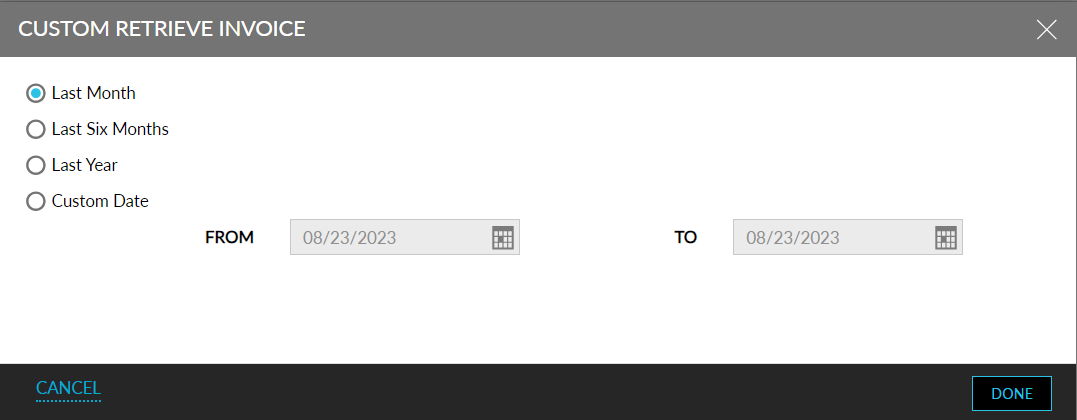
Last Month
This option is selected by default. When selected, the invoices in the last 30 days from the current property date are retrieved and displayed. For example, if the current property date is 30th July 2023, all the invoices from 1st July 2023 until 30th July 2023 will be retrieved.
Last Six Months
When this option is selected, the invoices in the last 6 months from the current property date are retrieved and displayed. For example, if the current property date is 30th July 2023, all the invoices from 1st February 2023 until 30th July 2023 will be retrieved.
Last Year
When this option is selected, the invoices in the last 365 days from the current property date are retrieved and displayed. For example, if the current property date is 30th July 2023, all the invoices from 30th July 2022 until 30th July 2023 will be retrieved.
Custom Date
When this option is selected, the following date pickers will be enabled for selection:
-
From: Displays the current property date by default. Users can select the past date from which the invoices must be retrieved. Users can select any date up to a maximum of 400 days in the past from the current property date. Users cannot select any future date.
-
To: Displays the current property date by default. Users can select the past date up to which the invoices must be retrieved. Users cannot a date that is prior to the date selected in the From field. Users can select the other dates in the past up to the current property date. Users can also select the same dates in both the From and To fields.
Based on the dates selected, the closed invoices are retrieved and displayed.