Component Amounts Based on Date Range for Allowances
Stay is enhanced to extend the Component Amounts Based on Date Range functionality for allowance configurations. Users can now define allowance amounts by date range for additional allowance frequency types, including Per Night, Per Stay, and Custom frequencies.
All supported allowance frequency types can now use custom allowance amounts for specific date ranges. This functionality applies to package allowances, add-on allowances, and group components.
Previously, users could not configure allowance amounts based on date ranges for the Per Stay or Per Night frequencies that included departure dates.
The Component Amounts Based on Date Range option is available for the following frequency combinations:
Per Night
-
Per Night + Departure
-
Per Night + Arrival + Departure
Per Stay
-
Per Stay
-
Per Stay + Arrival
-
Per Stay + Departure
-
Per Stay + Arrival + Departure
Custom
-
Every (n) Nights
-
Days of Week (Multiple Selection)
-
On This Night (Multiple Selection)
For package allowance components, these options can be configured from Settings ➜ Rates ➜ Packages ➜ Add/Edit ➜ Components ➜ Add Allowance ➜ Allowance.
The enhancement also applies to add-on allowances, and group components.
Date Range-Based Allowance Processing
Users can configure multiple date ranges with corresponding allowance amounts in the Component Amounts Based on Date Range section.
When an allowance is applied, the following actions are performed:
-
The reservation date is first evaluated against the configured Component Amounts Based on Date Range entries.
-
When the applicable reservation date falls within a configured date range, the corresponding allowance amount is applied.
-
When the date does not fall within any configured date range, the default allowance amount is applied.
-
Date ranges within the Component Amounts Based on Date Range section cannot overlap.
-
When overlapping date ranges are detected, the following message is displayed: Overlapping days are not allowed.
Per Night Frequency
The Per Night frequency supports the following combinations:
-
Per Night + Departure
-
Per Night + Arrival + Departure
For these frequency types, allowance amounts are determined by the configured date ranges. When a reservation date does not match any configured date range, the default allowance amount is applied.
Sample Scenario: Per Night + Departure
-
Reservation Dates: January 1, 2026, to January 6, 2026
-
Default Allowance Amount: $300
-
Component Amounts Based on Date Range:
|
Date Range |
Allowance Amount |
|---|---|
|
Dec 31 - Jan 2 |
$400 |
|
Jan 3 - Jan 4 |
$500 |
Since only the Include Departure option is selected, the allowance amount is calculated as follows:
|
Date |
Applied Allowance |
|---|---|
|
Jan 1 |
No allowance (arrival not included) |
|
Jan 2 |
$400 |
|
Jan 3 |
$500 |
|
Jan 4 |
$500 |
|
Jan 5 |
$300 |
|
Jan 6 |
$300 |
When the arrival date is also included, the allowance will be applied from January 1 through January 6.
Per Stay Frequency
The Per Stay frequency supports the following combinations:
-
Per Stay
-
Per Stay + Arrival
-
Per Stay + Departure
-
Per Stay + Arrival + Departure
For Per Stay frequencies, the following radio buttons are available in the Component Amounts Based on Date Range section:
-
First Night
-
Last Night
When date-based component amounts are configured for a Per Stay allowance, either First Night or Last Night must be selected to determine which applicable date is used to calculate the allowance amount for the entire stay.
For this calculation:
-
First Night refers to the first applicable date on which the allowance is applied and available for consumption by the guest. If arrival is included, the arrival date can be the first applicable date. If arrival is not included, the first applicable date is the following day.
-
Last Night refers to the last applicable date on which the allowance is applied and available for consumption by the guest. If departure is included, the departure date can be the last applicable date. If departure is not included, the last applicable date is the day before departure.
An information icon next to these options displays the following message when hovered over: For Per Stay, select either "First Night" or "Last Night" allowance to determine the rate for the entire stay.
Unlike Per Night frequencies, Per Stay frequencies apply a single allowance amount to the entire stay. The applicable allowance amount is determined by evaluating either the first applicable date or the last applicable date, based on the selected option and whether arrival or departure is included.
When the selected first or last applicable date does not fall within any configured date range, the default allowance amount is applied to the entire stay.
Example 1: Per Stay
Consider a reservation from January 8, 2026, to January 16, 2026, with the following configuration:
-
Default Allowance: $500
-
Selected Frequency: Per Stay
-
January 1-January 10: $600
-
January 15-January 20: $700
Because neither arrival nor departure is included, the applicable dates are January 9 through January 15.
When First Night is selected
-
The first applicable date is January 9.
-
January 9 falls within the January 1-January 10 date range.
-
Therefore, $600 is applied as the allowance amount for the entire stay.
When Last Night is selected
-
The last applicable date is January 15.
-
January 15 falls within the January 15–January 20 date range.
-
Therefore, $700 is applied as the allowance amount for the entire stay.
When the selected first or last applicable date does not fall within either configured date range, the default allowance amount of $500 is applied to the entire stay.
Example 2: Effect of Including Arrival
Consider the following configuration:
-
Stay Dates: January 2-January 6
-
Default Allowance: $200
-
Custom Date Range: January 1-January 2 = $400
-
Selected Option: First Night
When Arrival is included
-
The arrival date, January 2, is included in the allowance calculation.
-
Therefore, January 2 is the first applicable date on which the allowance can be consumed.
-
January 2 falls within the January 1-January 2 custom date range.
-
Therefore, $400 is applied as the allowance amount for the entire stay.
When Arrival is not included
-
The arrival date, January 2, is excluded from the allowance calculation.
-
The first applicable date becomes January 3.
-
January 3 does not fall within the configured custom date range.
-
Therefore, the default allowance amount of $200 is applied to the entire stay.
Frequency Application Logic
Per Stay
-
Arrival date is excluded.
-
Departure date is excluded.
-
For a January 8–January 16 stay, the applicable dates are January 9–January 15.
Per Stay + Arrival
-
Arrival date is included and can therefore be the first applicable date.
-
Departure date is excluded.
-
For a January 8-January 16 stay, the applicable dates are January 8–January 15.
Per Stay + Departure
-
Arrival date is excluded.
-
Departure date is included and can therefore be the last applicable date.
-
For a January 8-January 16 stay, the applicable dates are January 9-January 16.
Per Stay + Arrival + Departure
-
Arrival date is included and can be the first applicable date.
-
Departure date is included and can be the last applicable date.
-
For a January 8-January 16 stay, the applicable dates are January 8-January 16.
Custom Frequency
Every (n) Nights
For Every (n) Nights frequency, the allowance is applied as follows:
-
Allowances are applied according to the specified interval.
-
Arrival and departure dates are excluded by default.
-
When Include Arrival and Departure is selected, both dates are eligible for allowance application.
-
When an applicable date falls within a configured component date range, the configured amount is applied.
-
Otherwise, the default allowance amount is used.
Sample Scenario
-
Reservation Dates: January 1,2026 to January 8,2026
-
Arrival Date: January 1st
-
Departure Date: January 8th
-
Default Allowance Amount: $500
-
Configured Date Ranges
|
Date Range |
Allowance Amount |
|---|---|
|
Jan 1 - Jan 3 |
$600 |
|
Jan 4 - Jan 7 |
$800 |
Since arrival and departure dates are excluded, frequency processing occurs from January 2 through January 7.
-
Jan 2nd is treated as the first night in the frequency calculation.
-
For an Every 2 Nights frequency, allowances are applied on Jan 3rd, Jan 5th, and Jan 7th.
The allowance is applied as follows:
|
Date |
Applied Allowance |
|---|---|
|
Jan 3 |
$600 |
|
Jan 5 |
$800 |
|
Jan 7 |
$800 |
When the departure date is included, Jan 8th will receive the default allowance amount of $500 because it does not fall within a configured date range.
Days of Week
For Days of Week frequency, the allowance amount is applied as follows:
-
Allowances are applied on dates matching the selected day(s) of the week throughout the reservation.
-
For example, if Sunday is selected, allowances are applied on every Sunday within the stay period.
-
-
When Include Arrival or Include Departure is not selected, allowances are not applied on arrival or departure dates even if those dates match the selected day.
-
When an applicable date falls within a configured component date range, the configured allowance amount is applied. Otherwise, the default allowance amount is used.
On This Night
The On This Night frequency supports the following options:
-
Day of Arrival
-
First Night
-
2nd Night
-
3rd Night
-
4th Night
-
5th Night
-
6th Night
-
7th Night
-
Last Night
-
Day of Departure
For these options, first night refers to the night after the arrival day, and last night refers to the night before the departure day.
For this frequency type:
-
Day of arrival and day of departure can be selected directly from the frequency options.
-
The Include Day of Arrival and Include Day of Departure checkboxes are disabled.
-
The selected nights determine when allowances are applied.
-
Each applicable night is evaluated to determine whether the date falls within a configured component date range and applies either the configured allowance amount or the default allowance amount.
A new option, Repeat Pattern, is available when the On This Night frequency is selected. The Repeat Pattern option follows a 7-day cycle. When First Night is selected and Repeat Pattern is enabled, the pattern repeats every seven nights.
When first night is selected and Repeat Pattern is enabled, the allowance recurs every seven nights throughout the stay. For example, the allowance is applied on the 1st, 8th, 15th, 22nd night, and continues at the same seven-night interval.
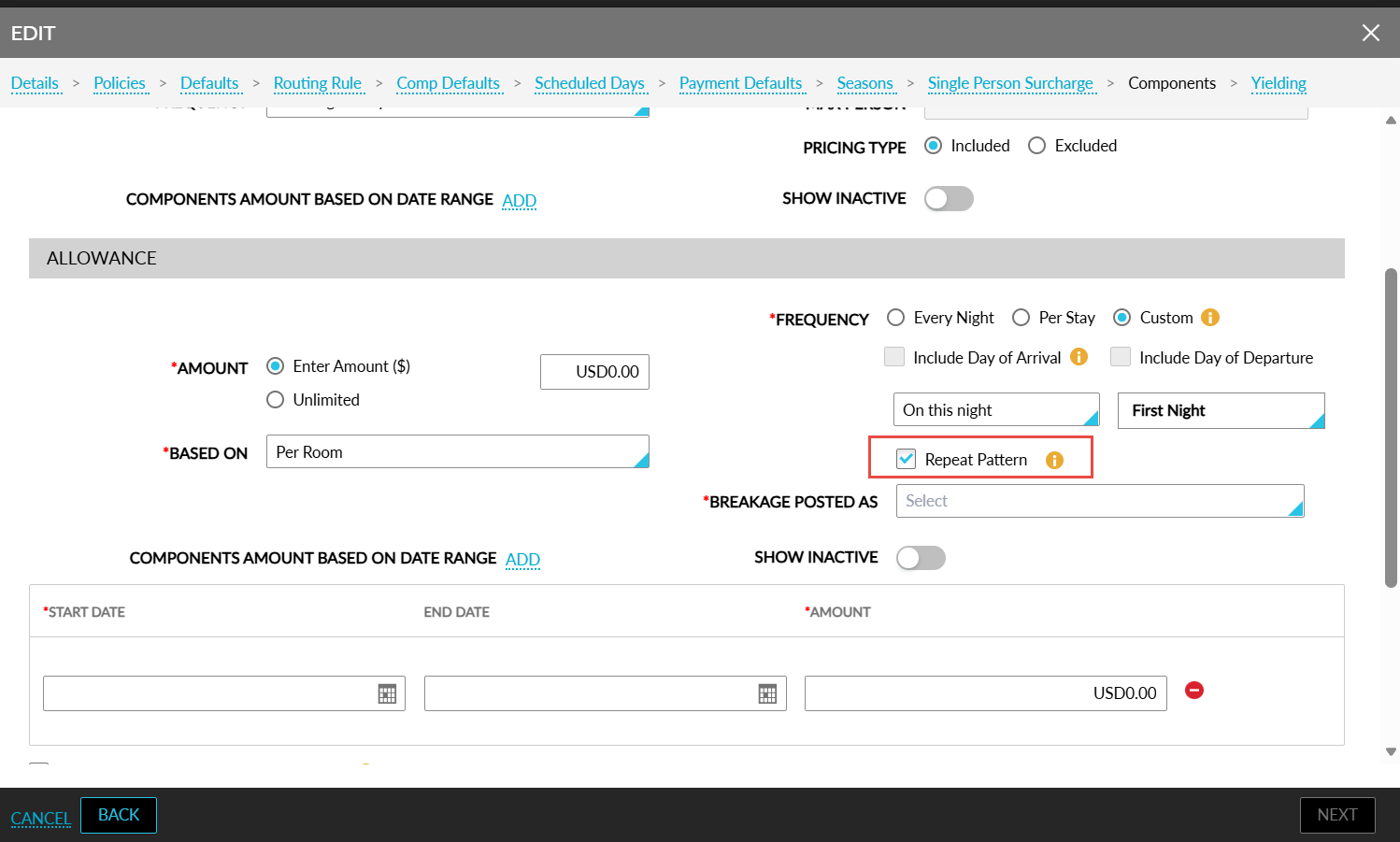
An information icon added next to this checkbox displays the following message when hovered upon: The selection will recur every 7 nights. For example if the First Night is designated for repetition, the corresponding allowance will be issued on the 8th night of the stay, excluding the arrival and departure dates.
Group and Package Allowances
When an allowance is configured within a group or package and a reservation includes both group/package and BAR rate plan dates, allowance calculations are applied only to the dates covered by the group or package.
For example, consider a reservation booked as follows:
-
Jan 1, 2026, to Jan 5, 2026: Group/Package
-
Jan 6, 2026 to Jan 10, 2026: BAR rate plan
In this scenario, the allowance frequency rules are applied only to Jan 1 through Jan 5. When a group/package date falls within a configured component date range, the corresponding custom allowance amount is applied. When no component date range applies, the default allowance amount is used.
Impacted Areas
The Component Amounts Based on Date Range enhancement is applicable across the following allowance configuration and usage areas, and is not limited to package allowance configuration:
This enhancement is applicable to the following areas:
-
Packages
-
Add Allowance setup
-
-
Add-Ons
-
Individual Add-On setup
-
On-the-fly allowance Add-Ons
-
-
Reservations
-
Creating reservations
-
Adding Add-Ons to existing reservations using Choose Add-Ons
-
-
Groups
-
Room Block Components
-
Room Block Add-Ons
-
-
Benefits
-
Key Access Area