Integration of Enhanced E-Coupons with IG POS System
Stay is enhanced to support the integration of enhanced e-coupons with IG POS systems, allowing controlled sharing, validation, and consumption of e-coupons through the POS interface.
To support this enhancement, a new flag, Enhanced Coupons, has been added to the Type tab of the Point of Sale Settings pop-up screen (Interfaces ➜ On-Premise Settings ➜ Point of Sale ➜ Add). This flag will be enabled by default when the Enhanced Coupon feature setting is enabled, and the Interface Type is selected as InfoGenesis.
An information icon added next to this flag displays the following message when hovered upon: Enhanced Coupon details will be shared to InfoGenesis by activating this toggle.
This flag is also displayed in the Default Settings pop-up screen (Interfaces ➜ On-Premise Settings ➜ Point of Sale ➜ Default Settings). This flag is not applicable for the Comtrol interface.
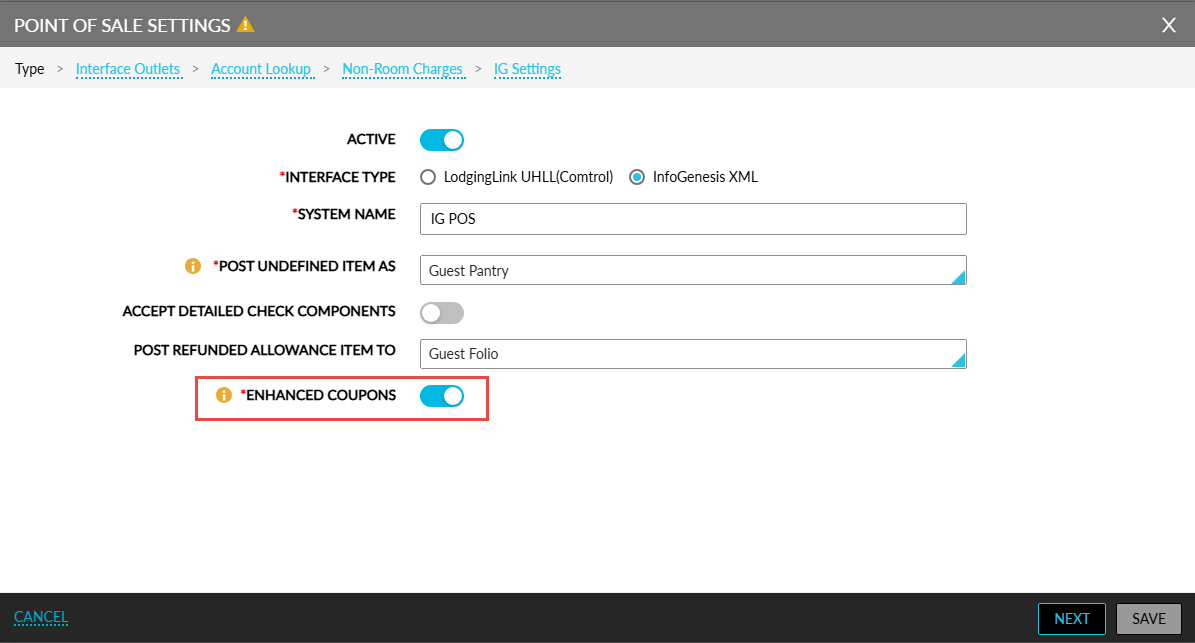
Enhanced Coupon Details Shared to InfoGenesis
When the flag is enabled, the following enhanced e-coupon details will be shared in the Account Lookup response to IG POS systems:
-
E-coupon code and name
-
Description
-
Coupon value
-
E-coupon status (available / consumed)
-
Date and time of consumption of the coupon
Only the following coupons will be shared:
-
Coupons in the Available status
-
Coupons in the Consumed status (consumed only on the date of lookup)
When the flag is disabled, the enhanced coupon details will not be shared in the Account Lookup response.
POS Interface Behaviour
Users will receive coupons in the Available and Consumed statuses in the Account Lookup response sent from IG POS system. Users can select only the coupons that are available. The coupon value cannot be overridden.
When posting charges, the following details will be shared by the IG POS system to Stay:
-
E-coupon code
-
Value to be consumed
POS Check Validation
Stay will receive the e-coupon and its value from the IG POS system and perform the following validations:
-
Whether the e-coupon is still available for the reservation.
-
Whether the Enhanced Coupon feature setting is turned on.
When the validations are successful:
-
Stay will apply the e-coupon against the PMS items mapped in the POS interface settings.
-
The value shared from the IG POS system will be applied.
When no items are mapped, the coupon will be applied against the item configured in the Posted Undefined Item As field in the Type tab of the Point of Sale Settings pop-up screen.
When the validation is not successful, the following message will be displayed: E-Coupon is not available. The coupons applied will continue to be processed in Stay as per the existing functionality when the Enhanced Coupon flag is disabled.
Posting Room Charges to Reservations
The following table lists the various scenarios in which room charges are posted to reservations:
|
Scenario |
Description |
|---|---|
|
When the total charge is equal to the value of the coupon. For example:
|
Only the Coupon Posting message is sent from the POS system. The Room Charge Posting message is not sent since the balance is $0. The coupon is applied to the mapped PMS items in Stay. Refund requests initiated for the applied coupons will not be validated in Stay since coupons once used cannot be reinstated. |
|
When the total charge is not equal to the value of the coupon. For example:
|
Both the Coupon Posting message and the Room Charge Posting message is sent from the POS system. Both the requests are processed independently. Refund requests can be processed only for the room charges posted. Refunds cannot be processed for the coupons applied. |
Posting Non-Room Charges to Reservations
The following table lists the various scenarios in which non-room charges are posted from IG POS systems:
|
Scenario |
Description |
|---|---|
|
When a check is posted from an IG POS system that includes both coupon and payment for non-room charges. |
|
|
When a check is posted from an IG POS system that includes a coupon, room charges, and payment. |
|