Manage Shared Reservations from Batch Operations Screen
Stay is enhanced to support the management of shared reservations through the Batch Operations screen, allowing users to make bulk updates to the reservations while maintaining the configured rate and charge split rules.
Update Add-Ons for Reservations
When users update add-ons for reservations using the Update Add-Ons option in the Batch Edit tab of the Batch Operations screen (Front Desk ➜ Batch Operations ➜ Batch Edit ➜ More ➜ Update Add-Ons), the Add Component Bundle pop-up screen will be displayed. When users select the component bundle and click Save, the Confirmation pop-up screen will be displayed.
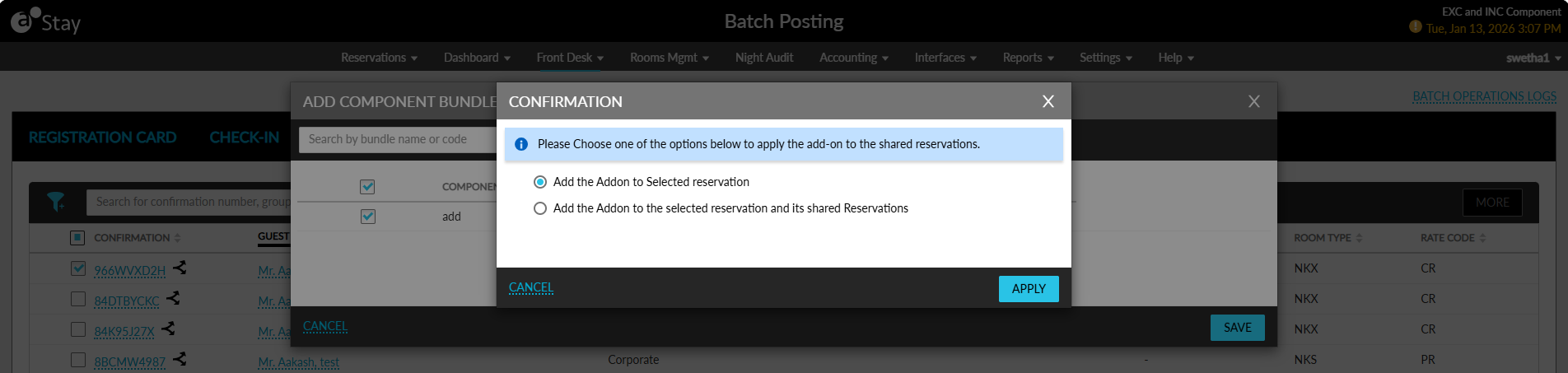
Users can select from the following options to apply the changes:
-
Add the add-on to this selected reservation: Selecting this option will apply the add-on only to the selected reservation.
-
Add the add-on to all the selected reservations and their shared reservations: Selecting this option will apply the add-on to:
-
All selected reservations, and
-
All reservations within their respective share sets.
-
When users click Apply, the add-ons will be applied based on the selected option.
When the add-on contains per room charges:
-
The room charges will be split based on the value configured in the Charges pop-up screen (Reservation ➜ Reservation Summary ➜ Share badge ➜ Charges).
-
The user will not be able to modify the selected option from the Batch Operations screen.
If the add-on contains a per room allowance component, the add-on will be applied only to the selected reservation, even when the option, Add the add-on to all selected reservations and their shared reservations, is selected.
Update Housekeeping Pattern
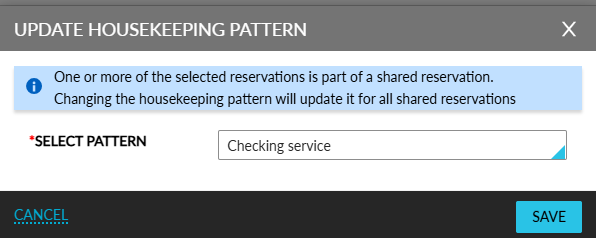
When any reservation from a share set (primary or secondary) is selected and the housekeeping pattern is updated through the Batch Edit tab (Front Desk ➜ Batch Operations ➜ Batch Edit ➜ More ➜ Update Housekeeping Pattern), the following message will be displayed in the Update Housekeeping Pattern pop-up screen and the updated housekeeping pattern will be applied to the entire share set: One or more of the selected reservations is part of a shared reservation. Changing the housekeeping pattern will update it for all shared reservations.
Batch Operation Logs
All housekeeping pattern updates made through the Batch Operations screen will be captured in the Batch Operation Logs (Front Desk ➜ Batch Operations ➜ Batch Operations Logs ➜ Batch Posting).
When the user selects only two reservations, but the update impacts the entire share set, the log will capture the changes for all affected reservations in the share set, and not the reservations originally selected alone.