Modify In-House Function Room Bookings
Stay is enhanced to allow users to modify function room bookings when the associated reservation is In‑House.
This enhancement is not applicable to single day function room bookings
The Modify Function Room hyperlink in the Function Room screen will be available when the reservation status is In‑House. Users can modify upcoming future dates only. Only dates greater than the current property date can be modified. Past dates are locked and cannot be selected or modified.
Users cannot modify F&B Services or A/V Services that occurred in the past. Valid on dates for past records cannot be modified. Charges associated with past dates cannot be updated and will remain unchanged.
When users click Save in the Modify Function Room pop-up screen, the updated charges for the future dates will be posted to the associated folio. Charges for past dates will remain unchanged.
The following fields in the Booking Details tab of the Modify Function Room pop-up screen can be modified for the future dates:
-
Event Name
-
Company Name
-
Guaranteed Status
-
Contract Status
-
Function Type
-
Comments
-
Third‑Party Source & Confirmation
All updates are tracked in the Function Room History section. The updated values are displayed the following areas:
-
Function room booking details
-
Templates
-
Reports
Estimated Charges
The estimated charges can be modified for the future dates only. The charges associated with the past dates that are already posted cannot be modified.
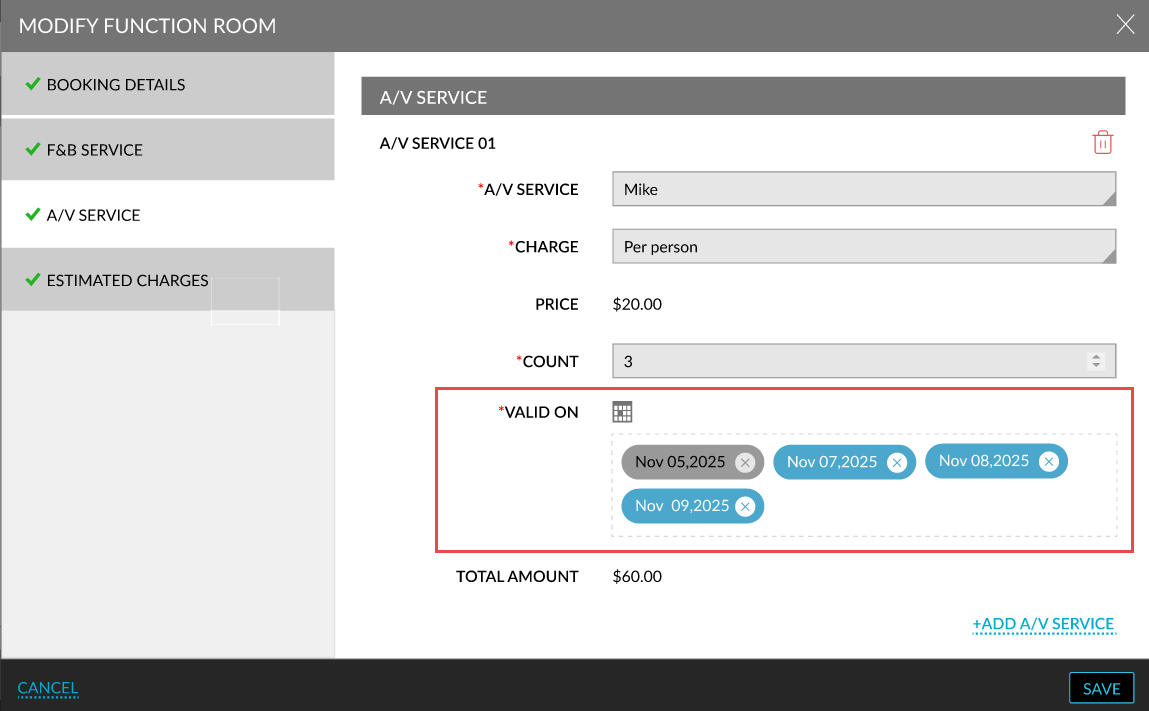
F&B Services and A/V Services
For the F&B and A/V services, the date in the Valid On field can be modified for future dates only. The services in the past that are already completed cannot be modified. New services can be added using the Add Service hyperlink.