November 2026
Release 26.1.2
Carry Forward Unused Per Night Allowances
Stay is enhanced to carry forward unused allowance amounts configured with the Per Night frequency.
Previously, when a guest did not fully utilize the allowance available for a specific night, the remaining allowance expired at the end of the day and could not be used on a subsequent day. For example, if a guest had an allowance of $100 per day and consumed only $50, the remaining $50 could not be carried forward to the next day.
With this enhancement, the unused allowance amount can be carried forward and used on the subsequent days.
To support this enhancement, a new checkbox, Floating Allowance, has been added when configuring allowances with the Per Night frequency (Settings ➜ Rates ➜ Packages ➜ Add/Edit ➜ Components ➜ Add Allowance ➜ Allowance ➜Per Night). This option is not available when the Per Stay and Custom frequency options are selected.
When this checkbox is selected, the following additional options are displayed:
-
Carry Forward: When selected, any unused allowance amount is automatically carried forward and remains available for use on subsequent eligible dates within the reservation stay dates. The unused allowance amount is calculated as follows: Unused Allowance = Available Allowance - Consumed Allowance.
-
Advance Allowance: When selected, guests can use future-dated allowance amounts before the scheduled date, subject to the total allowance available for the stay.
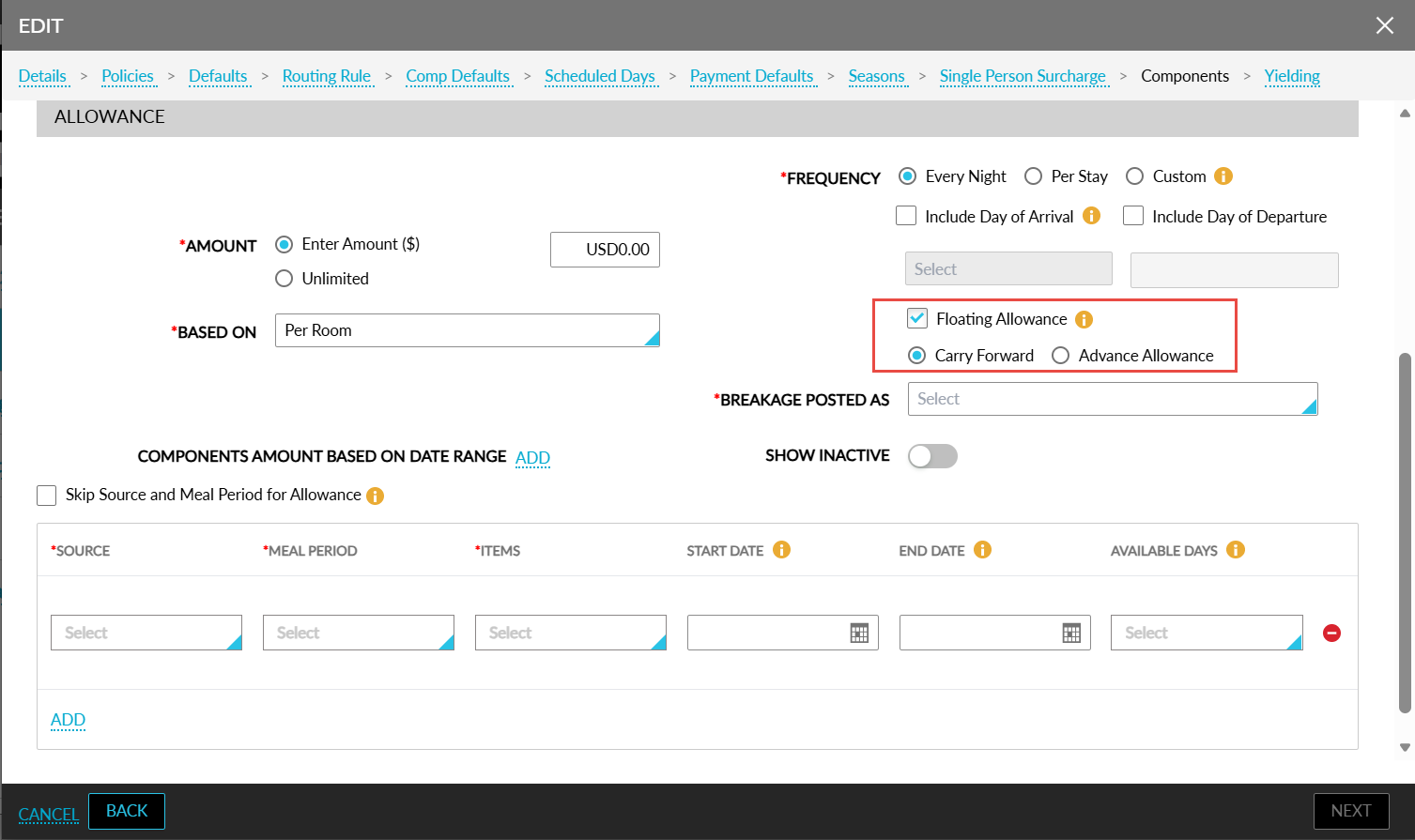
An information icon is added next to the Floating Allowance checkbox to provide details about the functionality of the Carry Forward and Advance Allowance options.
Carry Forward Unused Allowance
Consider a reservation from Jan 1, 2026, to Jan 4, 2026, with a per-day allowance of $100. The Carry Forward and Include Arrival/Departure Date options can be selected based on the applicable allowance configuration in the Add/Edit pop-up screens (Settings ➜ Rates ➜ Packages ➜ Add/Edit ➜ Components ➜ Add Allowance ➜ Allowance).
When the Carry Forward option is selected, any unused allowance balance is carried forward to the next eligible day and added to the available allowance for that day.
For the reservation from Jan 1, 2026, to Jan 4, 2026, the allowance amount is calculated as follows:
Include Arrival Date
-
On Jan 1, the guest has an available allowance of $100 and consumes $50. The remaining $50 is carried forward to Jan 2.
-
On Jan 2, the available allowance becomes $150 ($100 daily allowance + $50 carried forward). As no allowance is consumed, the entire $150 is carried forward to Jan 3.
-
On Jan 3, the available allowance becomes $250 ($100 daily allowance + $150 carried forward). The guest consumes $200, leaving $50 as unused allowance.
Since the Include Departure Date option is not selected, the unused allowance amount cannot be used on the departure day, Jan 4.
Include Departure Date
Since the Include Arrival Date option is not selected, the allowance amount cannot be used on the arrival day, Jan 1.
-
On Jan 2, the guest has an available allowance of $100 and consumes $50, leaving $50 to be carried forward.
-
On Jan 3, the available allowance becomes $150 ($100 daily allowance + $50 carried forward). As no allowance is consumed, the full $150 is carried forward.
-
On Jan 4, the available allowance becomes $250 ($100 daily allowance + $150 carried forward). The guest consumes $200, leaving $50 as unused allowance.
Include Arrival and Departure Dates
When both the Include Arrival Date and Include Departure Date options are selected, the allowance amount will be available on both the arrival and departure dates.
-
On Jan 1, the guest has an available allowance of $100 and consumes $50. The remaining $50 is carried forward to Jan 2.
-
On Jan 2, the available allowance becomes $150 ($100 daily allowance + $50 carried forward). As no allowance is consumed, the entire $150 is carried forward to Jan 3.
-
On Jan 3, the available allowance becomes $250 ($100 daily allowance + $150 carried forward). The guest consumes $200, leaving $50 as unused allowance.
-
On Jan 4, the available allowance becomes $150 ($100 daily allowance + $50 carried forward).
Advance Allowance
When the Advance Allowance option is selected, the total allowance for the reserved stay becomes available immediately and can be redeemed at any time during the stay.
The projected allowance is calculated as follows: Projected Allowance = Nightly Allowance × Reserved Nights.
For example, consider the following values:
-
Allowance per day: $100
-
Reserved Stay: 3 nights from Jan 1, 2026, to Jan 4, 2026
-
Projected Allowance: $300
The guest can redeem the entire $300 allowance on the first night of stay without waiting for the per day allowance amounts to become available.
Check Allowance Enhancement
The Advance Allowance and Include Arrival/Departure Date options can be selected as part of the allowance configuration in the Add/Edit pop-up screens (Settings ➜ Rates ➜ Packages ➜ Add/Edit ➜ Components ➜ Add Allowance ➜ Allowance).
When Advance Allowance is enabled, the Remaining Allowance column in the Package Allowance pop-up screen that appears when users check the allowance amount for a reservation (Reservation ➜ Package Folio ➜ Check Allowance) displays the total projected allowance for the reservation.
For example, consider the following values:
-
Allowance per day: $100
-
Reserved Stay: 3 nights from Jan 1, 2026, to Jan 4, 2026
-
Projected Allowance: $300
At the beginning of the stay, the remaining allowance value is displayed as $300, allowing users to view the total allowance available for redemption.
Example: Include Arrival Date
When Include Arrival Date is selected, the arrival date is included when determining the allowance available for the stay.
Consider a reservation with a three-night stay from Jan 1, 2026, to Jan 4, 2026, and a per day allowance of $100.
-
The total allowance available for the stay is $300 (Jan 1 = $100, Jan 2 = $100, Jan 3 = $100).
-
On Jan 1, the guest consumes charges of $200.
-
Because Advance Allowance is enabled, the guest can utilize $200 in allowance, which includes $100 allocated for Jan 1 and $100 allocated for Jan 2.
-
On Jan 2 and on Jan 3, the remaining $100 allowance is available for use.
Example: Include Departure Date
When Include Departure Date is selected, the departure date is included when determining the allowance available for the stay.
Consider a reservation with a three-night stay from Jan 1, 2026, to Jan 4, 2026, and a per day allowance of $100.
-
The total allowance available for the stay is $300 (Jan 2 = $100, Jan 3 = $100, Jan 4 = $100).
-
On Jan 2, the guest consumes charges of $250.
-
Because Advance Allowance is enabled, the guest can utilize $250 in allowance, including allowance amounts allocated for Jan 2, 3, and a portion of day 4.
-
On Jan 3 and on Jan 4, only the unused portion of the allowance remains available.
Example: Include Arrival and Departure Dates
When both the Include Arrival Date and Include Departure Date options are selected, both the arrival and departure dates are included when determining the allowance available for the stay.
Consider a reservation with a three-night stay from Jan 1, 2026, to Jan 4, 2026, and a per day allowance of $100.
-
The total allowance available for the stay is $400 (Jan 1 = $100, Jan 2 = $100, Jan 3 = $100, Jan 4 = $100).
-
On Jan 1, the guest consumes charges of $200.
-
Because Advance Allowance is enabled, the guest can utilize $200 in allowance, which includes $100 allocated for Jan 1 and $100 allocated for Jan 2.
-
On Jan 2, Jan 3, and Jan 4, the remaining $200 allowance is available for use.
Automatic Allowance Reconciliation for Advance Allowance
When a reservation is modified, Stay automatically recalculates the projected allowance based on the updated stay duration as follows: Total Projected Allowance = Nightly Allowance × Updated Reserved Nights.
When the guest has redeemed more allowance than the recalculated projected allowance, an allowance adjustment is automatically posted and categorized using the configured transaction code and the following reason is displayed: Reason: Allowance adjustment due to stay modification.
The adjustment amount is posted for the following scenarios:
-
Reservation shortened before allowance redemption.
-
Reservation shortened after allowance redemption.
-
Reservation extended before allowance redemption.
-
Reservation extended after allowance redemption.
-
Multiple advance allowances with reservation modifications.
-
Reservations containing a combination of Advance Allowance and Standard Per Night allowances.
This enhancement is applicable to allowances configured through the following areas:
-
Add-On Configuration
-
Package Components
-
Group Components
-
Loyalty