Payments for Multiple Folios Using a New Credit Card and Other Payment Methods
Stay is enhanced to support payments for multiple folio payments with a new credit card selected as one of the payment methods. The enhancement ensures that the new credit card payment is always processed first, followed by all remaining payment methods, while maintaining the existing parallel‑payment behavior.
This enhancement is applicable to the payments made in the following accounts that do not involve split payments:
-
Reservations
-
Groups
-
House Accounts
Processing Credit Card Payments
When users initiate payments for multiple folios and one of the payment methods selected is New Credit Card, the following actions will be performed:
-
The payment made using the new credit card will be processed first.
-
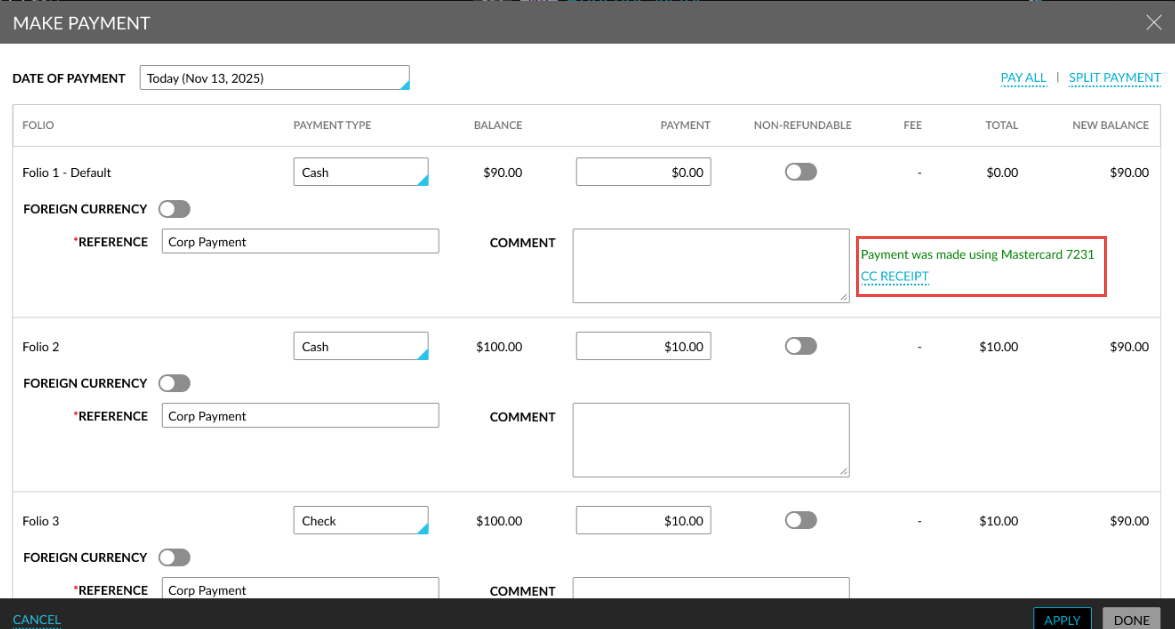
After the payment is processed, users will be navigated to the Make Payment pop-up screen, and the following message will be displayed: Payment posted successfully using <Card issuer with last 4 digits>.
-
For successful completion of payments, users can print the receipt of payment by clicking on the CC receipt hyperlink displayed at the folio-level.
-
Once the payment is processed, the default payment method associated with the folio will be displayed at the folio-level. For partial payments, users can initiate another payment.
-
Users must click the Apply button to process the remaining payments.