September 2026
Release 26.1
Settle All Transactions When the EOD Settlement is Initiated
Stay has been enhanced to allow users to process payment transactions made both at the property and above-property levels in a single batch when the End of Day (EOD) Settlement message is triggered for a property.
Previously, payments made in Stay were processed separately from above-property payments.
The End-of-Day Payment Settlement Notification feature setting must be enabled to use this feature.
-
When this feature setting is enabled, the End of Day (EOD) Settlement message is triggered during the closure of the accounting date, and the following fields will be enabled in the Credit Card section of the Agilysys Pay Setup screen:
-
EOD Level
-
EOD Group Code
-
-
When the feature setting is disabled, the message will not be triggered, and the mentioned fields will be disabled.
Gateway Configuration Management
When users enable the Utilize Configuration flag in the Credit Card section of the Agilysys Pay Setup screen (All Settings ➜ Accounting ➜ Agilysys Pay Setup ➜ Credit Card), a new pop-up screen, Confirmation, appears that displays the following message: Please ensure that the gateway configurations have been successfully onboarded in the Agilysys Pay Central Configuration Portal through Agilysys Pay Support. Failure to complete this onboarding process may result in transaction failures and potential revenue loss.
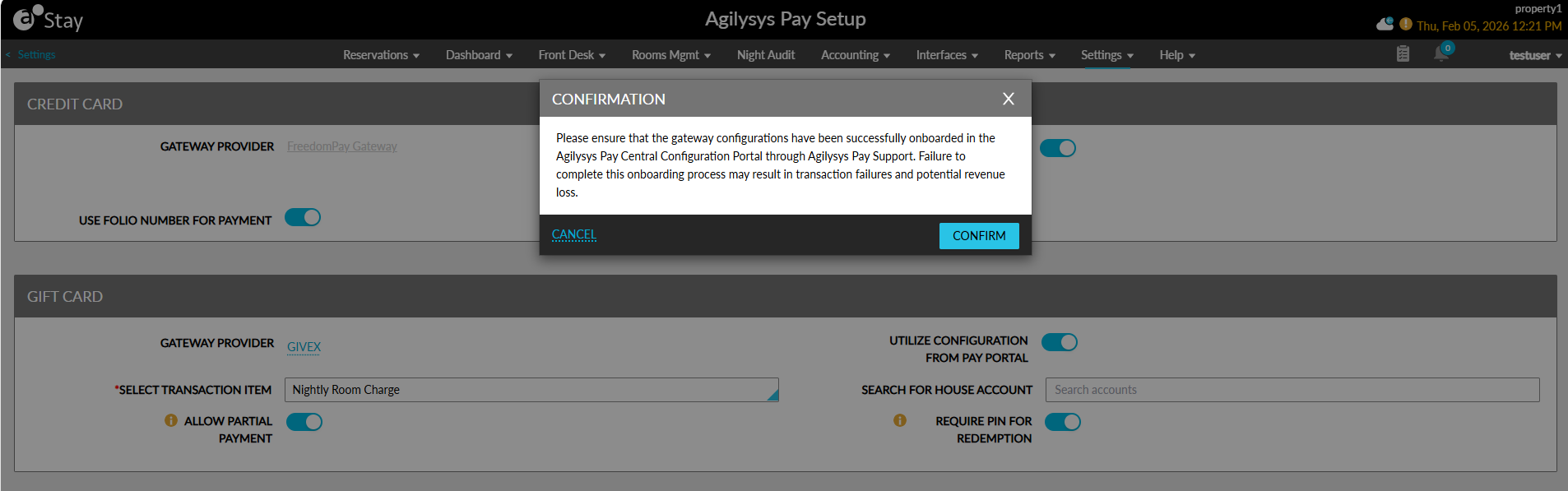
When users click Cancel or Close, the pop-up screen is closed, and the flag will not be enabled.
When the Confirm button is clicked, the pop-up screen is closed, and the flag will be enabled. The configurations are retrieved from the Agilysys Pay Central Configuration Portal. The retrieved details are used to initiate the End of Day (EOD) Settlement message.
When users disable the Utilize Configuration flag that was previously enabled, the Confirmation pop-up screen appears that displays the following message: By disabling this toggle, you acknowledge that gateway configurations will be managed directly within Stay, and Agilysys Pay Central Configuration will no longer be utilized.
When users click Cancel or Close, the pop-up screen is closed, and the flag will not be enabled.
When the Confirm button is clicked, the pop-up screen is closed, and the flag will be disabled. Once the flag is disabled, the settings configured in the Credit Card section of the Agilysys Pay Setup screen will be used.
Configure Settings for EOD Settlement
The following new fields have been added to the Credit Card section of the Agilysys Pay Setup screen:
|
Field |
Description |
|---|---|
|
EOD Level |
This is a single-select drop-down list that allows users to select from the following options:
The selected value is sent in the End of Day (EOD) Settlement message from Stay. |
|
EOD Group Code |
This is a text field that is displayed only when the EOD Level is selected as P. The value entered in this field is sent in the End of Day (EOD) Settlement message from Stay. |
When the Agilysys Pay Central Configuration is enabled, the property ID is sent from Stay, which dynamically retrieves the EOD Level and EOD Group Code values from the Pay Central Configuration. The retrieved values are included in the End of Day (EOD) Settlement message.
When the Agilysys Pay Central Configuration is disabled, the EOD Level and EOD Group Code values are taken from the locally configured settings in Stay and are included in the End of Day (EOD) Settlement message.
End of Day (EOD) Settlement Responses
The following responses are received for the End of Day (EOD) Settlement message:
-
Success Response: Received when the EOD settlement is completed successfully.
-
Failure Response: Received in the following scenarios:
-
Required configuration is missing
-
The EOD Level is not selected or when the selected value is invalid
-
The EOD Group Code is not selected or when the selected value is invalid
-
When the selected values are not successfully communicated to the Pay Central Configuration or payment gateway
-
Night Audit Error Logs
Any failure response received for the End of Day (EOD) Settlement message is logged in the Error Log tab of the Night Audit screen.
The failure response is logged regardless of whether the Utilize Configuration flag is enabled or disabled.
Records in Audit Log Screen
Users can track the status of the End of Day (EOD) Settlement notification in the Audit Log screen (Reports ➜ Audit Log).