Stay - Comtrol Integration Enhancements
Various enhancements have been made to the Stay - Comtrol integration.
Send Guest Profile Updates in Batch
The Stay - Comtrol integration is enhanced to improve how guest profile updates are sent to Comtrol. Instead of sending multiple messages separately, related updates are now grouped and sent together as a single batch.
When guest profile details such as name, reservation, or language are updated, Stay sends the corresponding updates to Comtrol. Previously, each update was sent as a separate message. Now, all related updates for a guest are combined and sent together in one batch. These updates apply to all in-house and reserved reservations associated with the guest profile.
This enhancement reduces the number of messages exchanged between Stay and Comtrol and ensures all updates reach Comtrol at the same time.
The following actions are performed when a guest profile is updated:
-
When only one reservation associated with the profile is impacted, a single update is sent.
-
When multiple reservations associated with the profile are impacted, all updates are grouped into one batch.
The batch update sent from Stay is received by Comtrol and processed accordingly.
Guest Profile-Based Messaging
The Stay - Comtrol integration is enhanced to ensure that guest-related messages are sent only when the relevant profile data is modified. This reduces unnecessary message traffic and improves overall efficiency and accuracy of data synchronization between Stay and Comtrol.
The integration is enhanced to prevent duplicate Check-In, Guest Reservation, Guest Name, and Language messages when those messages have already been triggered by reservation-related actions, reducing unnecessary message traffic and improving synchronization efficiency.
The following message types are triggered from Stay when a guest profile data is modified:
-
Check-in
-
Guest Name
-
Guest Reservation
-
Language
These messages will be triggered for all in-house and reserved reservations associated with the guest profile. Through this enhancement, the messages are sent only when specific, relevant fields are updated.
The following table lists the various conditions that must be satisfied for the messages to be sent:
|
Message |
Conditions |
|---|---|
|
Check-in |
This message is sent only when the Room Check-In flag is enabled in the On-Prem Device section of the Comtrol interface and the reservation status is In-House. At least one of the following fields must be modified:
|
|
Language |
This message is sent only when:
|
|
Guest Name |
This message is sent only when:
|
|
Guest Reservation |
This message is sent only when the Guest Reservation flag is enabled in the On-Prem Device section of the Comtrol interface and the status of the reservation is Reserved. At least one of the following fields must be modified:
|
Check-In Message Enhancements
The Stay - Comtrol integration is enhanced to improve the performance and scalability of the Check-in message type. Bulk data retrieval is used for restriction limit values instead of making repeated individual requests for each reservation or phone extension.
Check-in room (14) messages sent to Comtrol require restriction limit data (DFID 89). Previously, this data was retrieved through multiple individual requests for each reservation and phone extension, resulting in redundant calls and performance inefficiencies. Now, restriction limit data is retrieved in bulk and reused across message processing, significantly reducing the number of external service calls.
This enhancement is also applicable to the Parking request and Restrict Phone messages, where restriction limit values are now shared instead of being requested separately.
The restriction limit data is now retrieved once per property or batch of reservations. This data is reused across all related message processing flows and shared across different message types instead of being fetched repeatedly.
Parking Request Messages
The Stay - Comtrol integration is enhanced to improve the performance of Parking Request message processing by leveraging bulk data retrieval for restriction limit values.
Parking Request messages (07) sent to Comtrol require restriction limit data (DFID 89). Previously, this data was retrieved through individual requests for each reservation, leading to multiple redundant calls and performance inefficiencies. Now, the restriction limit data is retrieved in bulk for multiple reservations and reused during message processing.
When multiple reservations require Parking Request messages, the restriction limit data is now retrieved once for the property or batch and reused across all applicable reservations.
Restrict Phone Messages
The Stay - Comtrol integration is enhanced to improve the performance of Restrict Phone (60) message processing by leveraging bulk data retrieval for restriction limit values.
Restrict Phone messages (60) sent to Comtrol require restriction limit data (DFID 89). Previously, this data was retrieved through individual requests for each reservation, resulting in repeated calls and performance inefficiencies.
Now, restriction limit data is retrieved in bulk for multiple reservations and reused during message processing.
When multiple reservations require Restrict Phone messages, the restriction limit data is now retrieved once for the property or batch and reused across all applicable reservations.
Message Reliability
The Stay - Comtrol integration is enhanced to ensure that failures in retrieving specific field data do not prevent outbound messages from being generated and tracked.
Previously, when the field data required for device messages failed to be retrieved, the entire message generation process could be blocked. As a result, it was difficult for users to track messages and resulted in communication gaps with Comtrol.
Now, messages will continue to be generated even when some field data cannot be retrieved, allowing the system receiving the message to determine whether the message should be sent to Comtrol.
When field data retrieval fails:
-
The message is still created with available data
-
Missing fields do not block message generation
Each field is processed independently. Failure to retrieve one field does not impact retrieval of other fields. The system receiving the message determines whether the message should be sent to Comtrol and how the missing data must be handled.
Search Using Room Number and Last Name
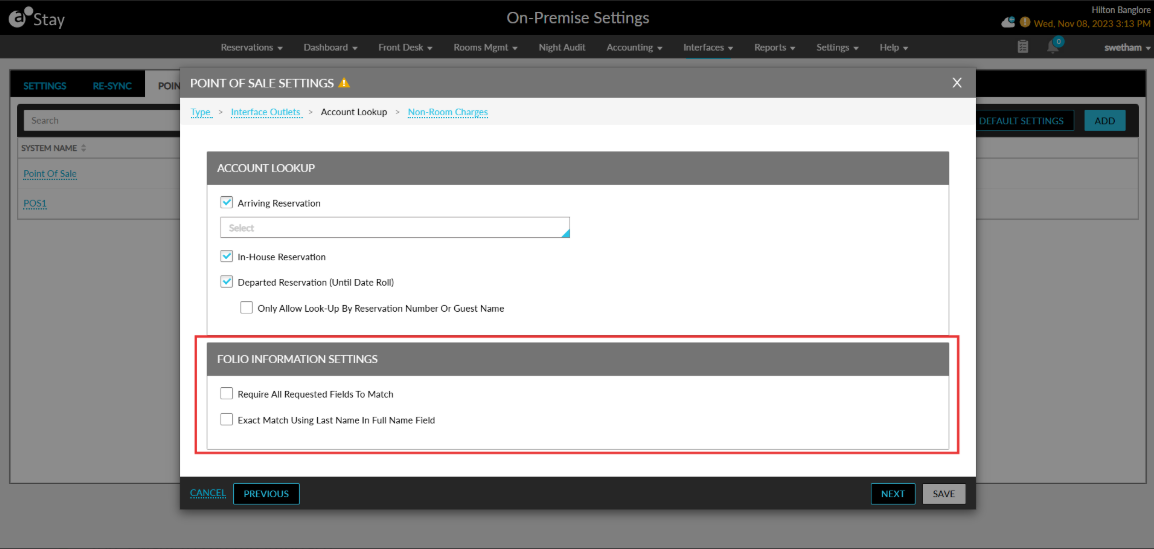
The Stay - Comtrol integration is enhanced to improve the search accuracy for the folio information requests sent by Comtrol by introducing additional configuration options in the Account Lookup section of the Point of Sale Settings pop-up screen in Stay.
To support this enhancement, a new section, Folio Information Settings, has been added below the Account Lookup section that displays the following fields:
-
A new flag, Require All Requested Fields to Match, has been added that is used to define how search results are returned.
When this flag is enabled, Stay returns only those records that match all applicable fields provided in the request. These fields include room number (including house account or group code when multi-search is enabled), account reference (including charge posting ID when multi-search is enabled), station number, guest name, reservation number, membership number, group name, and group number.
When the Requests Use Exact Room Matching flag is disabled, partial room matches are also considered while evaluating the combined results. An extensive search is performed that excludes any field that is already used in room or account searches to avoid duplication.
For example, when room number is already part of the room search, it will not be included again in the extensive search. This behaviour is controlled by the settings configured in the Multi Search section of the Comtrol interface.
When this flag is disabled, the existing search behaviour remains unchanged.
-
A new flag, Exact Match Using Last Name in Full Name Field, has been added to refine the guest name search behavior.
When this flag is enabled, the guest name search considers only the last name from the full name provided. The match must be exact, and partial matches or first-name matches are not considered. When this flag is disabled, the existing functionality is continued, allowing partial matches and matching based on both first and last names.
Search Scenarios
When a request includes both account number and guest name, and multi-search for the account is enabled along with comprehensive search, Stay performs an account search using the account number and charge posting ID. At the same time, a comprehensive search is performed for the guest name while excluding account-related fields. Only records that match both inputs are returned.
When a request includes room number and guest name, and room multi-search is disabled but comprehensive search is enabled, Stay searches using the room number and performs a comprehensive search for the guest name while excluding the room number field. Only records that match both criteria are returned.
When a request includes room number, account number, and guest name with all flags enabled, Stay performs separate searches for room and account fields and uses comprehensive search only for the guest-related fields. Fields already used in other searches are excluded from comprehensive search. Only records that match all three inputs are returned.
When this flag is enabled and a guest name is provided, Stay matches only records where the last name exactly matches the input. Partial matches or matches based on first names are not considered.